Setting objectives is the easy part. Keeping 30 people aligned on those objectives across a 90-day quarter while projects shift, priorities change, and half the team works remotely — that’s where things fall apart.
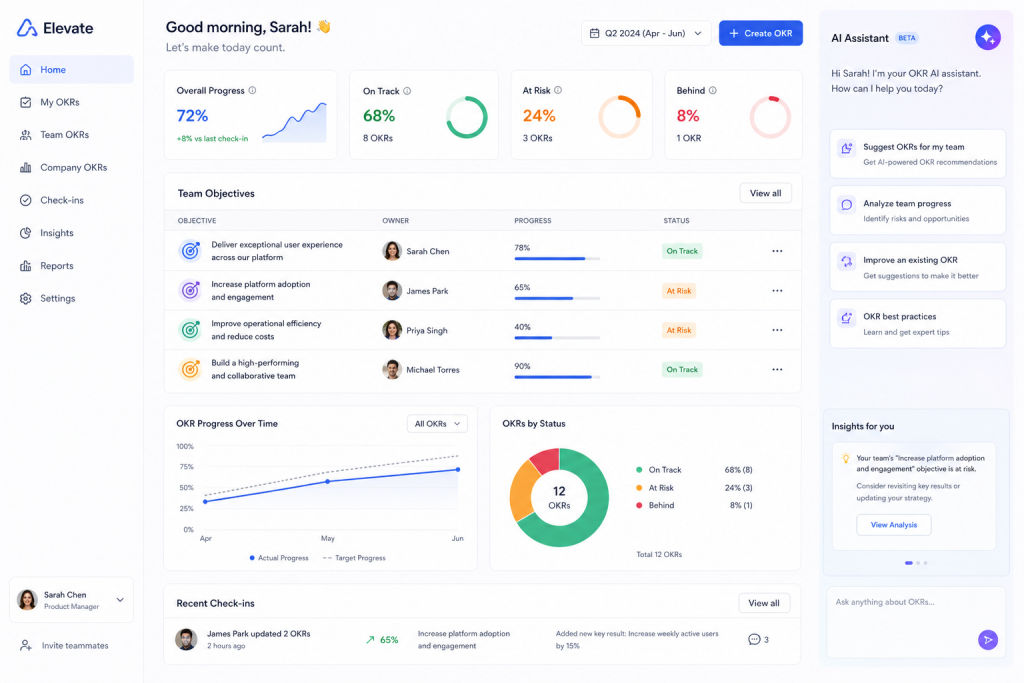
OKR software has existed for years, but the latest generation adds something different: AI that drafts key results, flags at-risk goals before they stall, and automates the weekly check-in nobody wants to write. The question is which tool actually delivers on that promise without turning into another unused dashboard.
I spent three weeks testing seven platforms — running real OKRs with a cross-functional team of 12 — to find out which ones work in practice, not just in demos.
Why AI Changes the OKR Game
Traditional OKR tools are glorified spreadsheets with tree views. You type objectives, nest key results underneath, and manually update progress every week. The failure mode is predictable: by week four, half the team stops checking in.
AI shifts three things that matter:
- Drafting: Instead of staring at a blank field wondering how to write a measurable key result, the AI suggests options based on your objective and historical data.
- Check-in automation: Tools pull progress data from integrations (Jira tickets closed, revenue dashboards, support metrics) and update key results automatically.
- Risk detection: Pattern matching identifies goals trending toward failure early enough to course-correct.
None of this replaces good management judgment. But it removes the friction that kills OKR programs in their first quarter.
The 7 Tools Compared
Here’s the lineup I evaluated, ranging from lightweight startups to full enterprise suites:
| Tool | Starting Price | AI Features | Best For | G2 Rating |
|---|---|---|---|---|
| Tability | $6/user/mo | AI goal drafting, automated check-ins, Slack nudges | Small-to-mid teams wanting simplicity | 4.6/5 |
| Profit.co | $7/user/mo | AI-suggested KRs, predictive analytics, 8 OKR views | Mid-market teams needing structure | 4.7/5 |
| Peoplebox | $8/user/mo | AI goal creation, auto-tracking from integrations | Teams combining OKRs with performance reviews | 4.5/5 |
| Quantive StrategyAI | $9/user/mo | AI strategy assistant, automated KR tracking, whiteboards | Enterprise strategy execution | 4.6/5 |
| Weekdone | $10.8/user/mo | Weekly planning AI, status report automation | Teams wanting OKRs + weekly planning combined | 4.5/5 |
| Lattice | $11/user/mo | AI-assisted goal setting, performance-OKR linking | HR teams unifying goals with reviews | 4.7/5 |
| Betterworks | Custom pricing | AI coaching, continuous feedback, calibration | Large enterprises (1000+ employees) | 4.3/5 |
Tability: Best for Teams That Hate Admin Work
Tability built its entire product around one insight: OKR programs die when check-ins feel like homework. Their Slack and Teams integration sends gentle nudges asking for updates, and their AI generates suggested progress based on connected data sources.
What works well:
The async update flow is genuinely the smoothest I tested. You get a Slack message, reply with a quick update or just confirm the AI’s suggestion, and you’re done. The whole thing takes 15 seconds. Their AI drafting for key results is solid — it suggests 3-4 options that are actually measurable, not vague corporate filler.
Where it falls short:
If you need complex alignment trees across multiple departments, Tability feels thin. It’s built for teams of 5-50, not organizations of 500. Reporting is functional but basic compared to Profit.co or Quantive.
Pricing: $6/user/month for the Team plan. Free tier available for up to 5 users with limited AI features.
Profit.co: Best for Process-Oriented Teams
Profit.co offers eight different views of your OKRs — list, Gantt, alignment tree, heatmap, hierarchy, progress, scorecard, and table. That sounds like overkill until you realize different stakeholders genuinely need different perspectives.
What works well:
The PROFIT Score system gives every objective a calculated health metric combining progress percentage, check-in frequency, and alignment quality. Their AI suggests key results based on your industry and role, and the suggestions are surprisingly context-aware. Integration with HRIS platforms (BambooHR, Workday, SAP SuccessFactors) means employee data flows in without manual entry.
Where it falls short:
The learning curve is real. We spent nearly a full week getting everyone comfortable with the interface. The abundance of views and configuration options means decision fatigue during setup. Smaller teams will find 60% of features unnecessary.
Pricing: Free for up to 5 users. Growth plan starts at $7/user/month. Enterprise pricing requires a call.
Peoplebox: Best for Connecting OKRs to Performance Reviews
Peoplebox positions itself at the intersection of goal management and talent management. Their pitch: OKRs shouldn’t live in a separate tool from performance reviews because the two inform each other.
What works well:
The AI-powered goal creation pulls context from your company’s existing objectives and suggests cascaded goals that align properly. Their integration depth is impressive — they connect with Jira, Asana, HubSpot, Salesforce, and others to automatically track key result progress. Business review meetings get auto-generated decks showing OKR progress across teams.
Where it falls short:
If you only want OKR tracking without the performance management layer, you’re paying for features you won’t use. The platform assumes you want the full talent management stack. Setup requires HR involvement, which slows deployment for engineering-led teams.
Pricing: OKR Platform at $8/user/month (billed annually). Full suite combining OKRs with talent management runs $15/user/month.
Quantive StrategyAI: Best for Enterprise Strategy Teams
Formerly known as Gtmhub, Quantive rebranded around their AI-first strategy execution platform. Their AI assistant helps translate high-level strategic bets into measurable OKRs, then monitors execution through automated data connections.
What works well:
The OKR whiteboard is genuinely useful for planning sessions. You brainstorm objectives visually, then convert them into structured OKRs with one click. Their automation for key results is the most sophisticated I tested — connecting to 150+ data sources and updating progress without human intervention. For companies with 500+ people, the alignment visualization alone justifies the price.
Where it falls short:
The platform underwent significant changes during the rebrand, and some longtime users report confusion about feature availability. Pricing gets expensive quickly at enterprise scale. The AI suggestions, while good at strategy level, sometimes generate overly complex key results that need simplification.
Pricing: Teams plan at $9/user/month. Enterprise pricing is custom and typically runs $15-20/user/month for the full StrategyAI suite.
Weekdone: Best for Teams That Live in Weekly Rhythms
Weekdone combines OKR tracking with weekly planning and status reporting. Their philosophy: quarterly objectives only work when broken into weekly activities. The platform connects your week-to-week tasks directly to quarterly key results.
What works well:
The weekly planning ritual is well-designed. Every Monday, team members set their weekly plans linked to OKRs. Every Friday, they report progress. The AI automates status reports for managers, summarizing team progress without requiring a separate meeting. For teams already doing weekly standups, this replaces the manual recap.
Where it falls short:
The AI features feel bolted on rather than native. The core product is still fundamentally about weekly reporting with OKR context, and the AI adds convenience without transforming the workflow. The interface looks dated compared to newer competitors. Free tier (3 users) is too limited for meaningful evaluation.
Pricing: Free for up to 3 users. Paid plans start at $10.80/user/month with volume discounts for larger teams.
Lattice: Best for HR-Led OKR Programs
Lattice is primarily a people management platform that includes OKRs as part of a broader performance ecosystem. Goals, reviews, feedback, engagement surveys, and compensation planning all live in one place.
What works well:
The connection between OKR progress and performance reviews is seamless. Managers see goal completion directly in review interfaces, eliminating the “wait, what did they accomplish this quarter?” problem. AI assists with goal writing and suggests objectives based on role and department patterns. The 4.7/5 G2 rating reflects genuinely high user satisfaction.
Where it falls short:
OKRs are one module among many, not the core focus. If you want deep OKR-specific features like automated key result tracking from data sources, you’ll find Lattice lighter than dedicated tools. The modular pricing means a full deployment can exceed $20/user/month when you add engagement, compensation, and growth modules.
Pricing: Goals & OKRs standalone at $8/user/month. Performance + Goals bundle at $11/user/month. Full suite runs $20+/user/month.
Betterworks: Best for Large Enterprises
Betterworks targets organizations with 1,000+ employees who need OKRs woven into existing enterprise workflows. Their AI coaching feature provides managers with suggested actions based on team goal progress.
What works well:
The calibration tools help leadership teams compare OKR ambition and achievement across departments, normalizing for teams that sandbag versus teams that overcommit. AI-powered coaching nudges managers toward conversations with team members whose goals are at risk. Enterprise integrations (Workday, SAP, Microsoft 365) are production-ready, not beta.
Where it falls short:
Not publicly priced, which usually means expensive. Implementation timelines run 8-12 weeks for full deployment. The platform is overkill for companies under 500 people. User reviews mention that the interface requires training sessions, and adoption without executive sponsorship tends to stall.
Pricing: Custom enterprise pricing only. Typical contracts start at $15-20/user/month with annual minimums.
How to Choose: Decision Framework
Skip the feature comparison spreadsheet. These three questions will narrow your choice faster:
Question 1: What’s your team size?
- Under 20 people: Tability. You need simplicity and low friction above everything else.
- 20-200 people: Profit.co or Peoplebox, depending on whether you want standalone OKRs or OKRs integrated with performance management.
- 200-1000 people: Quantive or Lattice, depending on whether strategy execution or HR integration matters more.
- 1000+ people: Betterworks or Quantive Enterprise, with the budget and implementation timeline to match.
Question 2: Where does your team already live?
- Slack-first teams: Tability’s integration is best-in-class.
- Microsoft 365 shops: Betterworks and Lattice have deeper Microsoft integrations.
- Jira-heavy engineering teams: Peoplebox and Quantive connect directly to Jira for automated progress tracking.
- HRIS-centered orgs: Lattice and Profit.co integrate with major HR platforms.
Question 3: Is this your first OKR program?
First-time OKR adopters should prioritize simplicity over features. A tool your team actually uses beats a powerful platform nobody opens. Start with Tability or Weekdone, prove the habit works, then graduate to more sophisticated platforms as your OKR maturity grows.
The AI Features That Actually Matter
After testing all seven platforms, here’s what I’d prioritize in AI capabilities:
Worth paying for:
- Automated progress tracking from data integrations (saves 2-3 hours/week for managers)
- AI-drafted key results during goal setting (reduces “blank page” paralysis)
- Risk alerts when goals trend below expected progress curves
Nice but not essential:
- AI-generated status reports (saves time but doesn’t change outcomes)
- Natural language goal creation (cool demo, rarely used after week one)
- Predictive goal completion estimates (accuracy varies too much to rely on)
Marketing fluff to ignore:
- “AI strategy advisor” (usually just templated suggestions with GPT wrapper)
- “Intelligent alignment recommendations” (basic parent-child matching logic)
- “AI-powered insights” (standard analytics with an AI label)
Real-World Implementation Tips
Having rolled out OKR tools at three different companies, here are patterns I’ve seen repeatedly:
Start with one team. Don’t buy enterprise licenses day one. Run a pilot with 8-15 people for one full quarter. You’ll discover integration needs, workflow gaps, and adoption blockers before scaling.
The tool is 20% of success. Governance, cadence, and leadership modeling matter far more than software features. A team using Notion with discipline will outperform a team with Betterworks and no process.
Check-in frequency determines everything. Weekly check-ins with AI assistance work. Monthly check-ins fail regardless of tooling. If your team won’t commit to weekly updates, no AI feature saves you.
Budget for the annual plan. Every tool on this list offers 15-25% savings on annual billing. Given that OKR programs need at least two quarters to show results, monthly billing just costs you more while you’re still evaluating.
Bottom Line
The AI OKR space is maturing fast. Tools that felt experimental 18 months ago now offer genuine automation that reduces the administrative burden of running a goal-setting program.
My top pick for most teams: Tability for its friction-free design and smart AI defaults. For mid-market teams needing more structure: Profit.co delivers the most value per dollar. For enterprise strategy execution: Quantive StrategyAI has the deepest automation layer.
Whatever you choose, remember that the best OKR tool is the one your team opens every week. Fancy AI means nothing if adoption dies by month two. Start simple, prove the habit, then scale.
Related Reading
- Losing Control Doesnt Require Consciousness: The Night AI Breached AI
- After ChatGPT Started Running Ads, Which AI Tools Are Still Worth Paying For in 2026?
Stay updated with our latest AI insights