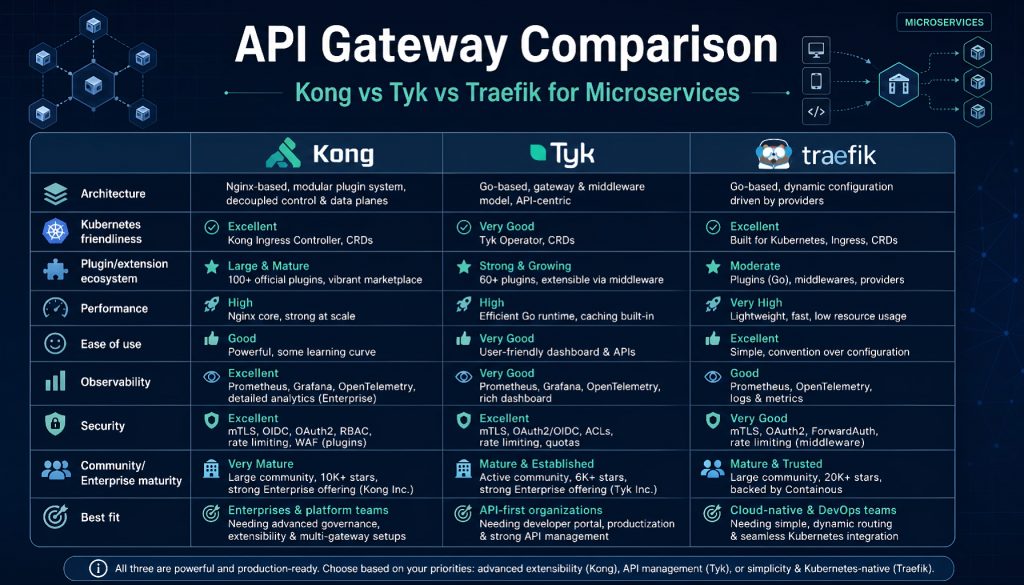
Once you split a monolith into microservices, the immediate problem is routing. You might have 20 services running on different ports. External requests come in and need to reach the right backend. Authentication needs to happen somewhere. Rate limiting needs to happen somewhere. If every service handles these concerns individually, maintenance becomes a full-time job.
An API gateway centralizes these cross-cutting concerns (auth, rate limiting, monitoring, routing) at the ingress layer. The major options in 2026 are Kong, Tyk, KrakenD, Traefik, and AWS API Gateway. Each makes different tradeoffs. Kong has the largest plugin ecosystem but consumes the most memory. KrakenD delivers extreme throughput but forces static configuration. Traefik auto-discovers services in Kubernetes but lacks enterprise features in its open-source tier.
This article covers what each tool does well, where it breaks down, and how to pick one based on your actual constraints.
Kong: The Plugin-Rich Incumbent
Kong runs on Nginx + OpenResty and has been open-source since 2015. Its plugin library now exceeds 300 options. Authentication (OAuth2, JWT, LDAP), rate limiting (sliding window with Redis cluster backing), logging (Datadog, Splunk), and request/response transformation all have production-ready plugins available.
The plugin ecosystem is Kong’s strongest asset. Adding Prometheus monitoring means installing one plugin, and route-level latency, error codes, and throughput metrics start collecting automatically. Canary deployments work through a weight-based traffic splitting plugin. The community is large enough that most edge cases already have GitHub issues with solutions.
Pricing: The open-source edition is free. Kong Enterprise starts at $3,000/month and adds RBAC, a developer portal, and advanced analytics. Small teams can run the open-source version without limitations. Enterprise features matter when you need multi-tenant isolation or audit logging.
Best fit: Organizations with diverse API requirements. If you run 50 microservices where some need OAuth2, others need IP whitelisting, and others need request body transformation, Kong’s plugin combinations cover most of those needs without custom code.
Where it hurts: Memory consumption is high. A single instance routing 100 APIs uses roughly 500MB of RAM. Configuration storage depends on PostgreSQL or Cassandra, so a database failure cascades to the gateway. High-availability deployments require primary-replica failover setup for the config store. The DB-less declarative mode is lighter but doesn’t support runtime modifications, meaning every config change requires a restart.
Practical advice: Kong works well for organizations that already have an ops team comfortable managing database clusters. If your team has three engineers total, the maintenance overhead will consume most of your time.
Tyk: High Performance in Go
Tyk is written in Go. Single-thread performance exceeds Kong by roughly 30%. Official benchmarks show 12,000 req/s compared to Kong’s 9,000 req/s on the same hardware (4 cores, 8GB RAM). It supports GraphQL federation, WebSocket proxying, and API versioning out of the box.
The dashboard is the standout feature for day-to-day operations. API creation, version switching, and analytics all live in one interface. The built-in developer portal generates documentation and handles API key request workflows, which saves you from building a management console from scratch. Rate limiting supports both Redis Sentinel and Redis Cluster, which keeps things stable under high concurrency.
Pricing: Open-source is free. The Cloud edition starts at $250/month (managed hosting, no infrastructure to maintain). Enterprise starts at $1,500/month for multi-datacenter support, RBAC, and custom plugins. Roughly half the cost of Kong Enterprise for comparable features.
Best fit: Products that expose APIs to external consumers. SaaS platforms that need to give customers API access can use Tyk’s developer portal and key management directly instead of building those flows internally.
Where it hurts: The plugin ecosystem is smaller than Kong’s. Custom plugins require either Go or the gRPC plugin protocol (Python/Node.js), and debugging is less convenient than Kong’s Lua plugin system. The GraphQL features exist but lag behind Apollo Gateway for complex query optimization.
Practical advice: If your team’s primary language is Go, Tyk is the natural choice. Performance is strong, maintenance is simple, and documentation is thorough. If you need heavy plugin customization, Kong gives you more options.
KrakenD: The Stateless Performance Machine
KrakenD markets itself as a “stateless API gateway.” All configuration lives in a single JSON file with no database dependency. The process starts, reads config, and forwards requests. Benchmarks hit 50,000 req/s on a 16-core machine with a median latency of 1.2ms.
Raw throughput is the headline, but the API aggregation capability is equally valuable. If your frontend needs to display user info, order history, and product recommendations in one view, KrakenD sends concurrent requests to three backend services and merges the responses into a single payload. This cuts client-side request count significantly. Response field filtering lets you trim a 100-field backend response down to the 10 fields the frontend actually needs, reducing bandwidth at the gateway layer.
Pricing: Open-source is free. KrakenD Enterprise starts at $1,000/month, primarily covering technical support and SLA guarantees. Compared to other enterprise tiers, it’s the most affordable option.
Best fit: Scenarios where throughput and low latency are hard requirements. Game backends, IoT device gateways, and high-frequency trading systems benefit from KrakenD’s speed. It works best when backend services are stable and routing rules don’t change frequently.
Where it hurts: Configuration is static JSON. Changes require a service restart. The Flexible Configuration feature (remote config loading) still restarts to take effect, so dynamic routing doesn’t work the way it does in Kong or Tyk. There is no management UI. All configuration is hand-written JSON, which creates a steep learning curve. Plugins must be written in Go and require recompiling the binary.
Practical advice: If performance is non-negotiable and config changes are infrequent (weekly, not daily), KrakenD is the right call. If you modify routing rules ten times a day, KrakenD will make your life difficult. Pair it with GitOps and CI/CD pipelines for automated deploys, because hand-editing JSON at scale is error-prone.
Traefik: Cloud-Native Service Discovery
Traefik was built for the container era. It integrates deeply with Kubernetes, Docker Swarm, and Consul. Add an annotation to a Kubernetes Service and Traefik picks up the routing rule automatically, with no manual configuration needed. It handles Let’s Encrypt certificate provisioning and renewal without intervention.
Dynamic service discovery is the defining feature. Deploy a new microservice and Traefik detects it, configures routing, and starts forwarding traffic. Take a service offline and Traefik removes it from the pool. It supports multiple protocols (HTTP, TCP, UDP, gRPC) with WebSocket and HTTP/2 working out of the box. The dashboard displays a real-time routing topology, which makes debugging straightforward.
Pricing: Open-source is free. Traefik Enterprise starts at $3,000/month and adds distributed rate limiting, API management features, and advanced monitoring. Small teams can run entirely on the open-source edition.
Best fit: Kubernetes environments where microservice count is high and deployments happen frequently. Teams with limited DevOps headcount that need automation to compensate.
Where it hurts: Enterprise-grade features are weak in the open-source tier. There’s no fine-grained access control or audit logging without the paid version. Rate limiting depends on middleware configuration that’s more complex than Kong’s plugin model. Performance trails KrakenD significantly, benchmarking around 12,000 req/s.
Practical advice: Inside a Kubernetes cluster, Traefik paired with an Ingress Controller is the path of least resistance. If you’re still deploying to VMs, Traefik’s advantages don’t materialize, and Kong or Tyk will serve you better.
AWS API Gateway: Managed Simplicity
AWS API Gateway is a fully managed service. No servers to provision, no high-availability setup to design. Creating APIs, configuring routes, and setting rate limits all happen in the AWS console within minutes. Integration with Lambda, DynamoDB, and Cognito is tight, making it the natural fit for serverless architectures.
The main value is zero operational burden. AWS handles scaling, failover, and patching. Pay-per-request pricing ($3.50 per million requests) makes it cheap at low traffic volumes. It supports API versioning, stage environments (dev/test/prod), and canary deployments.
Pricing: REST APIs cost $3.50 per million requests plus $0.09/GB for data transfer. HTTP APIs (a feature-reduced variant) cost $1.00 per million requests. Below 10 million monthly requests, the managed service is cheaper than self-hosting. Above that threshold, self-hosted options become more economical.
Best fit: Teams heavily invested in AWS where backend services already run on Lambda or ECS. Startups with low traffic and no dedicated ops team benefit from the managed model.
Where it hurts: Vendor lock-in is real, and migration costs are high. Cold start latency ranges from 10ms to 500ms, which rules it out for latency-sensitive applications. Custom plugin logic is essentially impossible; you’re limited to AWS-provided authorizers and validators. VPC access requires VPC Links at $0.01/hour per connection ($7.20/month each).
Practical advice: Pure AWS shops with small teams should default to API Gateway. If you have multi-cloud requirements or traffic volumes that demand fine-grained tuning, a self-hosted gateway gives you more control.
Decision Framework
| Scenario | Recommended Tool | Reasoning |
|---|---|---|
| , , , , , | , , , , , , , , – | , , , , , – |
| Diverse plugin requirements | Kong | 300+ plugins cover most use cases |
| External-facing API product | Tyk | Built-in developer portal and key management |
| Maximum throughput needed | KrakenD | 50,000 req/s at 1.2ms median latency |
| Kubernetes-native environment | Traefik | Automatic service discovery, auto-TLS |
| AWS-only stack | AWS API Gateway | Lambda integration, zero ops overhead |
| Team smaller than 5 engineers | Tyk or Traefik | Low maintenance burden, good documentation |
| Multi-tenant isolation required | Kong Enterprise or Tyk Enterprise | RBAC and audit logging |
Performance comparison (test environment: AWS c5.2xlarge, 8 vCPU, 16GB RAM):
| Gateway | Throughput | p50 Latency |
|---|---|---|
| , , , , – | , , , , , – | , , , , , , – |
| KrakenD | 50,000 req/s | 1.2ms |
| Tyk | 12,000 req/s | 3.8ms |
| Traefik | 11,000 req/s | 4.1ms |
| Kong | 9,000 req/s | 5.2ms |
| AWS API Gateway | Managed (AWS-guaranteed) | ~15ms (includes cold start) |
Memory footprint (100 configured routes):
| Gateway | RAM Usage |
|---|---|
| , , , , – | , , , , , – |
| KrakenD | 100MB |
| Traefik | 150MB |
| Tyk | 300MB |
| Kong | 500MB |
Making the Call
There is no perfect API gateway. There is only the one that fits your constraints.
Kong handles complex, plugin-heavy requirements at the cost of high memory usage and database dependency. Tyk balances performance with usability and works well for small-to-mid-size teams. KrakenD delivers extreme throughput but sacrifices dynamic configuration. Traefik excels inside Kubernetes and falls flat in traditional deployment environments. AWS API Gateway eliminates operational work but locks you into a single vendor.
Run the open-source edition for a few weeks before committing to an enterprise tier. See how the tool feels in your team’s hands. API gateways are foundational infrastructure. Picking the wrong one means expensive migration later. Spend an extra week on a proof-of-concept rather than rushing the decision.
The microservices tooling ecosystem is mature in 2026. Options are better than they were three years ago. But tools are still just tools. Architecture design and team capability matter more than which gateway you deploy. A perfectly configured gateway sitting in front of poorly written backend services won’t save you from traffic spikes.
Related Reading
- Best API Gateway for Microservices in 2026: Kong vs Tyk vs Traefik
- API Gateways for Microservices in 2026: Kong, Tyk, KrakenD, Traefik, and AWS Compared
Stay updated with our latest AI insights