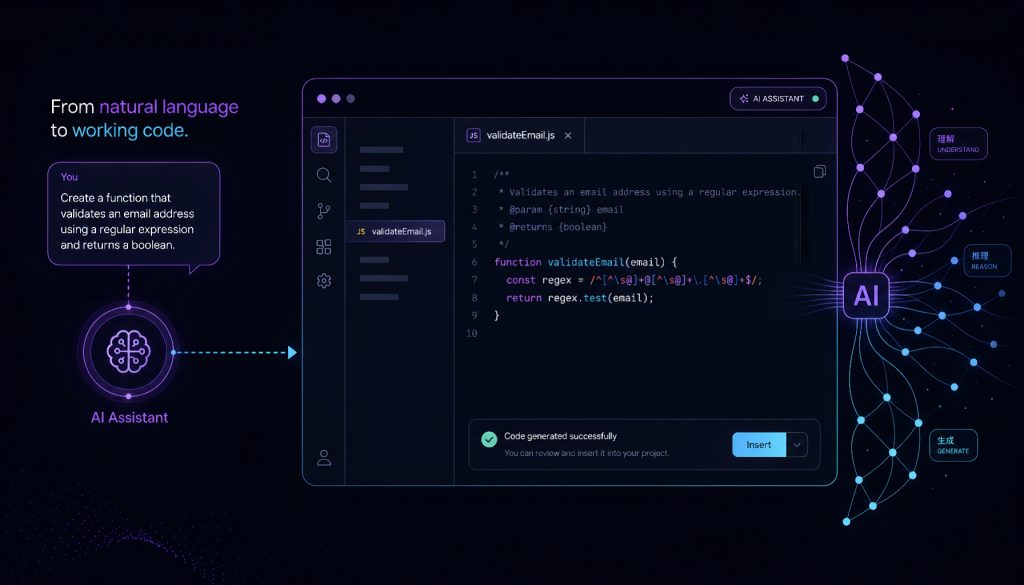
Two years ago, I used AI to autocomplete function names. Today, I describe what I want built, and an AI agent writes the entire module, tests it, and deploys it. The shift happened faster than anyone predicted.
We’re no longer in the “AI-assisted” era. We’ve crossed into something fundamentally different: AI as the primary developer, with humans steering. And the platforms enabling this aren’t just upgraded IDEs with chatbots bolted on. They’re built from scratch around a new assumption: the AI writes most of the code, and you manage the outcome.
Here’s what that looks like in practice, which platforms are winning, and what it means if you’re running a dev team in 2026.
The Paradigm Shift Nobody Prepared For
The old workflow: think about a problem, write code, debug, refactor, ship. Repeat.
The new workflow: define the problem clearly, let AI generate a solution, review it, adjust constraints, ship. The bottleneck moved from typing speed and syntax knowledge to problem definition and architectural judgment.
This isn’t a minor productivity bump. It’s a role change. Senior engineers who spent years mastering language quirks now spend their time on system design, integration decisions, and quality gates. Junior engineers who couldn’t ship a feature alone can now produce working prototypes in hours, guided by AI agents that handle the implementation details.
The tools that understood this shift early are the ones dominating the market right now.
What Makes a Platform “AI-Native”
Traditional dev tools added AI features incrementally. A suggestion here, a chat panel there. AI-native platforms flip the architecture: AI is the primary actor, and the human interface exists to guide, constrain, and approve.
The difference shows up in three ways:
Context awareness. AI-native platforms maintain full project context across sessions. They understand your codebase structure, dependencies, and patterns without you explaining them every time.
Agent autonomy. Instead of responding to line-by-line prompts, these platforms run multi-step workflows. You say “add user authentication with OAuth,” and the agent creates routes, middleware, database migrations, and tests in sequence.
Iterative refinement. The feedback loop is conversational. You review output, point out issues in natural language, and the agent adjusts. No more manually hunting through generated code to fix edge cases.
Five Platforms Worth Your Attention
Replit Agent
Replit rebuilt its entire platform around AI-first development. You describe an application in plain language, and the agent scaffolds it, writes the code, sets up the environment, and deploys it to a live URL. All within the browser.
Best for: Rapid prototyping, MVPs, solo builders who want to go from idea to deployed app in a single session. Startups validating concepts before committing to a full engineering investment.
Weakness: Complex enterprise architectures with specific infrastructure requirements still need more control than Replit offers. You’re trading customization for speed.
My take: If you need something live by end of day, Replit Agent is unmatched. I’ve seen non-technical founders ship functional SaaS products using nothing else. But once you hit scale, you’ll outgrow it.
v0.dev (Vercel)
Vercel’s v0 focused on the frontend gap that other tools left open. You describe a UI component or full page layout, and v0 generates production-quality React code using shadcn/ui and Tailwind. The output isn’t a rough sketch. It’s code you’d commit directly.
Best for: Frontend-heavy teams, design system work, landing pages, dashboards. Any situation where you know what you want visually but don’t want to spend three days hand-coding responsive layouts.
Weakness: Backend logic is minimal. You’ll still need another tool or manual work for APIs, databases, and business logic.
My take: v0 eliminated an entire category of frontend busywork for my team. Component generation that used to take a day now takes ten minutes of iteration. Pair it with Cursor for backend work and you have a full-stack AI workflow.
Cursor
Cursor took the IDE approach and pushed it further than anyone expected. It’s VS Code at its core, but the AI integration goes deep: multi-file edits, codebase-wide refactoring, and an agent mode that executes multi-step tasks autonomously within your local environment.
Best for: Professional developers working on existing codebases. Teams that need AI power without abandoning their current toolchain, git workflows, and deployment pipelines.
Weakness: The learning curve for effective prompting is real. Getting optimal results from Cursor requires understanding how to scope requests, provide context, and structure your codebase for AI readability.
My take: This is my daily driver. Cursor strikes the right balance between AI autonomy and developer control. You keep your existing project structure, your tests still run locally, and the AI operates within boundaries you set. For teams already invested in VS Code workflows, the migration cost is near zero.
Bolt.new (StackBlitz)
Bolt runs entirely in the browser using WebContainers. You describe what you want, and it generates a full-stack application with real-time preview. The key differentiator: everything runs client-side. No server round-trips for AI generation, no waiting for cloud environments to spin up.
Best for: Quick experiments, teaching, client demos. Situations where you need a working prototype visible in seconds, not minutes.
Weakness: The browser sandbox limits what you can build. Complex backends, specific database engines, and custom infrastructure requirements don’t fit the model well.
My take: Bolt is incredible for “show me what this would look like” moments. Client calls, brainstorming sessions, hackathons. But production workloads need to move somewhere else eventually.
GitHub Copilot Workspace
GitHub’s entry focuses on the planning-to-implementation pipeline. You start with an issue or feature description, Copilot Workspace generates a plan, proposes file changes across the repository, and creates a pull request. It’s designed for the GitHub-native workflow that most teams already use.
Best for: Enterprise teams deeply integrated with GitHub. Issue-driven development where the AI handles the implementation of well-defined tickets.
Weakness: The output quality varies more than competitors. Complex architectural decisions still need heavy human guidance, and the planning step sometimes misses non-obvious dependencies.
My take: If your team lives in GitHub Issues and PRs, Copilot Workspace fits into your existing process with minimal friction. It’s not the most powerful option, but it’s the most natural for teams that don’t want to change how they work.
Platform Comparison
| Platform | Primary Strength | Deployment | Best Team Size | Learning Curve |
|---|---|---|---|---|
| Replit Agent | Full-stack generation + instant deploy | Built-in (Replit hosting) | 1-3 people | Low |
| v0.dev | Frontend/UI component generation | Export to any React project | 2-10 people | Low |
| Cursor | Deep IDE integration + multi-file edits | Your existing pipeline | 3-50 people | Medium |
| Bolt.new | Browser-based instant prototyping | Export or StackBlitz hosting | 1-5 people | Low |
| Copilot Workspace | GitHub-native issue-to-PR pipeline | GitHub Actions / existing CI | 10-500 people | Low-Medium |
How Developer Roles Are Changing
The shift breaks down into three new responsibilities that matter more than raw coding ability:
Architecture and system design. When AI handles implementation, the quality of your architectural decisions becomes the primary differentiator. How you structure modules, define interfaces, and plan for scale determines whether the AI-generated code holds up under real load.
Review and quality assurance. AI writes fast but doesn’t always write correctly. The review skill set now includes evaluating generated code for security holes, performance issues, and logical errors that compile fine but fail in production. This requires deeper understanding, not less.
Orchestration and integration. Knowing which AI tool to use for which task, how to chain them together, and when to intervene manually. This is a new skill that didn’t exist two years ago, and senior engineers who master it are producing 5-10x more output than those who don’t.
The Small Team Golden Age
Here’s what I find most interesting about this moment: the economics of software development inverted. A three-person team with the right AI tooling can now ship at the pace that used to require fifteen engineers.
I’ve watched startups go from concept to launched product in under two weeks with two founders and an AI stack. Not crappy prototypes. Real products handling real users.
For enterprise teams, the decision is different. The question isn’t “should we adopt AI-native tools” but “how do we integrate them without breaking our compliance, security, and review processes.” The platforms that win enterprise adoption will be the ones that slot into existing governance frameworks rather than demanding organizations rebuild around them. Cursor and Copilot Workspace are ahead on this front.
The Timeline We Lived Through
2024: AI-assisted coding. Autocomplete on steroids. Copilot suggested lines, developers accepted or rejected. Productivity gains of 20-40% on routine tasks.
2025: AI-generated modules. Tools like Cursor and Replit Agent started writing entire features. Developers shifted from writing to reviewing. Teams shrank by 30-50% while shipping more.
2026: AI as primary developer. The platforms covered here don’t assist. They build. The human role is product vision, architecture, and quality gates. Teams that adapted early have a massive competitive advantage. Teams that didn’t are scrambling.
What This Means for Your Team
If you’re a technical leader making tooling decisions right now, here’s my honest assessment:
Solo builders and early-stage startups: Start with Replit Agent or Bolt.new. Get to market fast. Migrate to more controlled tooling when you have revenue and users.
Growing teams (5-20 engineers): Cursor as the daily environment, v0 for frontend acceleration. This combination gives you speed without sacrificing the control you need as complexity grows.
Enterprise (50+ engineers): Copilot Workspace for its GitHub integration and governance story. Supplement with Cursor for individual developer productivity. Evaluate Replit for internal tools and prototyping.
The platforms will keep evolving. What won’t change is the fundamental shift: developers who learn to work with AI agents, rather than competing against them, will define the next decade of software engineering.
The best time to adapt was 2024. The second best time is now.
Related Reading
- AI-Native Development Platforms in 2026: The Tools Changing How Teams Ship
- AI-Native Development Platforms and the Paradigm Shift: Building Software in 2026
Stay updated with our latest AI insights