Picture this: a build script that runs fine on your laptop. Same Docker image, same environment variables, same commands. You push it to CI and it breaks in three different ways. You spend two hours staring at logs, pushing empty commits to trigger reruns, and eventually fix it by adding a line you don’t fully understand. The build passes. You move on.
This scenario is familiar to anyone who has maintained a CI pipeline at scale. And as containerized workloads have become the default (Docker for packaging, Kubernetes for orchestration, multi-stage builds as standard practice), the CI pipeline itself has grown more complex. You’re no longer just running tests. You’re building images, managing layer caches, pushing to registries, and coordinating deployments across services that depend on each other.
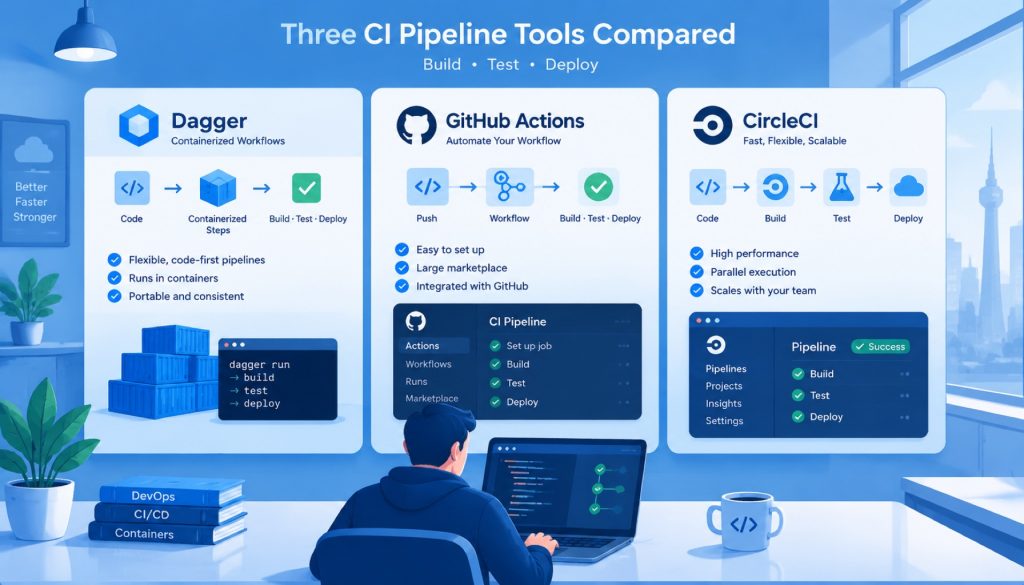
Three tools come up repeatedly in this space: GitHub Actions, CircleCI, and Dagger. They approach the problem from different angles, make different tradeoffs, and suit different teams. Here’s how to think through the choice.
GitHub Actions: The Gravity of the Ecosystem
For teams with code on GitHub, Actions is the path of least resistance. It’s baked into the platform. PRs trigger workflows automatically. Deployment approvals happen in the same interface where code gets reviewed. The Marketplace has tens of thousands of pre-built actions covering everything from container scanning to cloud deployments.
Containerized workflows are well-supported. The docker/build-push-action handles multi-platform image builds. Caching against GitHub Packages or an external registry has established patterns. If you’re already using GitHub Container Registry, the whole pipeline requires almost no extra configuration.
That said, using GitHub Actions at any real scale tends to surface a few consistent friction points.
Local debugging is the most common complaint. When something goes wrong in a YAML workflow, the feedback loop is: edit, commit, push, wait, read logs, repeat. The act tool exists to run workflows locally, but its compatibility with GitHub-hosted runner features is incomplete enough that complex workflows often behave differently on your machine than in CI. You end up debugging against the remote environment anyway.
Complex logic is another pressure point. YAML has no type system, no native abstraction mechanism, no way to unit test a function. When a workflow needs to dynamically determine which jobs to run based on which files changed, or coordinate build order across multiple repositories, the config file starts accumulating workarounds: reusable workflows, composite actions, shell scripts embedded in YAML strings. It works, but it gets brittle.
Cost is worth factoring in. GitHub Actions charges by the minute on hosted runners. For teams with heavy build workloads, that adds up. Self-hosted runners reduce cost but introduce maintenance overhead of their own.
—
CircleCI: Built by Engineers, for Engineers
CircleCI has been in the CI space long enough to have strong opinions, and those opinions show in the product.
Docker has been a first-class runtime here for years. The docker executor runs jobs directly inside containers. The machine executor gives you a full Linux environment for operations that need real Docker access, like building images with BuildKit or running Docker Compose for integration tests. Docker Layer Caching (DLC) is a paid feature, but for teams doing heavy image builds, the reduction in build time is measurable.
The orb system is worth understanding on its own terms. Orbs are reusable packages of configuration that can encapsulate complete job sequences, not just single steps. A team maintaining multiple services can publish an orb that standardizes how builds, tests, and deployments work across all of them, and update that standard in one place. It’s a real solution to a real problem.
Test parallelism is CircleCI’s strongest traditional differentiator. Based on historical timing data, it can automatically split a test suite across multiple containers, balancing load to minimize total time. For projects with large test suites, this delivers concrete results. Cutting a 20-minute test run down to 6 minutes changes how developers interact with CI.
SSH debugging is something CircleCI gets right that others don’t. When a build fails, you can SSH directly into the running environment and poke around. Check what’s on the filesystem, inspect environment variables, run commands interactively. This is meaningfully better than reading static logs, especially when the failure involves environment state that’s hard to reproduce.
CircleCI’s limitations are real too. Configuration is still YAML, so complex logic hits the same expressive ceiling as GitHub Actions. The integration with code-hosting platforms requires more setup than GitHub Actions’ native connection. If your team is split across GitHub and non-GitHub repositories, or if you want to keep CI infrastructure loosely coupled from code hosting, that friction is a constant low-level tax.
—
Dagger: The Pipeline Is the Program
Dagger starts from an observation: CI pipelines have grown into complex software systems, but we’re still describing them with config files. Config files can’t be unit tested. They have no type system. They can’t be run locally with confidence. When something breaks, you push and wait.
The Dagger approach is to make the pipeline a real program. You write Go functions that define what gets built, in what order, with what dependencies. Dagger’s engine handles the container operations, caches every step by content address, and runs the same code locally and in CI.
That last point is the one that matters most in practice. When a Dagger pipeline fails in CI, you can reproduce it on your laptop with the same command. No special setup, no environment emulation, no pushing empty commits. You run it locally, attach a debugger, inspect the container state at any step. Fix the problem, verify locally, push once.
The caching model is also distinct. Dagger caches at the content-address level, not at the CI platform level. If you switch from GitHub Actions to CircleCI tomorrow, the cache comes with you, as long as you configure the same cache backend. Your investment in cache hygiene isn’t tied to any vendor’s caching implementation.
For multi-service builds, Dagger’s model handles complexity that YAML can’t express cleanly. You can describe exactly which service’s build output feeds into another service’s base image, which integration tests depend on which services being ready, and which steps can run in parallel. This isn’t just pipeline-as-code in name. It’s the actual expressive power of a programming language applied to build logic.
The honest downsides: learning curve is real. Dagger has its own execution model (lazy evaluation, pipelines as directed acyclic graphs) that takes time to internalize. The ecosystem is younger. When you hit an unusual problem, there’s less community knowledge to draw on than with GitHub Actions. And the team needs to be comfortable with Go, Python, or TypeScript to get full value from it.
—
Side-by-Side Comparison
| Dimension | GitHub Actions | CircleCI | Dagger |
|---|---|---|---|
| Local debugging | Limited (act has compatibility gaps) | SSH into live environment | Native local execution, fully consistent |
| Pipeline language | YAML | YAML | Go / Python / TypeScript / Java |
| Container cache | Manual configuration required | DLC (paid feature) | Content-addressed, automatic |
| Vendor lock-in | High (deep GitHub integration) | Medium (portable with some friction) | Low (pipeline code runs anywhere) |
| Ecosystem maturity | Highest (vast Marketplace) | High (mature orb system) | Growing, younger |
| Learning curve | Low | Medium | High |
| Test parallelism | Manual configuration | Automatic based on history | Manual or custom |
—
How to Think About the Choice
There’s no universally correct answer here. The useful question is which tradeoffs match your situation.
If your code lives on GitHub and your build logic is straightforward, GitHub Actions is the right default. The ecosystem advantage is real. Most common use cases have a maintained action that handles them. The integration cost is minimal. Don’t introduce complexity for its own sake.
If build performance is a real bottleneck (large test suites, heavy image builds, teams blocked on CI wait times), CircleCI’s test parallelism and DLC are worth serious evaluation. The SSH debugging capability alone has saved hours of engineering time at teams that use it. And if you want a CI system that’s been purpose-built for the problem, rather than added to an existing platform, CircleCI is the mature choice.
If your team writes Go, Python, or TypeScript, cares about local reproducibility, and wants to decouple CI logic from any specific vendor, Dagger is worth the investment. The “local and CI behave identically” property sounds like a nice-to-have until you’ve spent an afternoon debugging a failure that only happens in CI. After that, it sounds like a requirement.
There’s also a hybrid path that’s working in practice at some teams: write pipeline logic in Dagger, use GitHub Actions or CircleCI as the execution backend. You get Dagger’s portability and local debugging, with the existing platform’s trigger mechanisms and integrations. For teams already committed to one of the YAML-based systems, this is a viable incremental migration. You don’t have to switch everything at once.
—
The Lock-In Question
This deserves a direct answer, not a diplomatic hedge.
GitHub Actions carries the highest lock-in risk of the three. It’s not just the YAML format, which is portable enough. The deeper bindings are GitHub-specific: hosted runner capabilities, GitHub Packages caching, GitHub Deployments approval flows, OIDC token integration with cloud providers. Once you’ve built workflows that rely on these features, the migration cost is substantial. For teams already deeply committed to GitHub as a platform, this is a reasonable tradeoff. For teams that treat CI as independent infrastructure, it’s worth being clear-eyed about.
CircleCI sits in the middle. YAML config is migratable. The orb system creates some platform dependency, but it’s manageable.
Dagger’s position on lock-in is the cleanest. Your pipeline is code. It runs locally, it runs on any CI backend, it’s not tied to any vendor’s execution environment. The Dagger engine itself is the only dependency, and it’s open source.
—
A Practical Test
If you’re undecided, try this: take the CI problem that causes your team the most pain right now (the flaky test, the slow image build, the workflow that only fails in CI) and implement it in all three tools. Not the whole pipeline. Just that one painful thing.
The tool that makes that problem easier to reason about, easier to debug, and easier to explain to someone else is probably the right one for your team.
That’s a more reliable signal than any benchmark or feature matrix.
Related reading
- Which AI Data Analysis Tool Actually Works: Julius AI, ChatGPT, Noteable, and Rows Tested in 2026
- Which AI Search Tool Actually Works? Perplexity vs ChatGPT Search vs Kimi vs Metaso in 2026
- GitHub Multi-Agent Coding Changes What AI Coding Actually Means
Stay updated with our latest AI insights