Last month, a friend running a cross-border e-commerce company hit a wall. His team had grown from 15 to 35 people, and the Gusto plan that worked fine at 15 was buckling under multi-state tax filings, benefits administration, and the manual setup grind every time someone new joined. He spent two weeks evaluating alternatives and nearly picked the wrong one.
I’ve seen this play out dozens of times. Small businesses treat payroll selection as a pure cost decision, but choosing wrong carries real costs: migration headaches, compliance exposure, and employees dealing with a worse experience. This piece breaks down the four most common tools for US-based SMBs in 2026 and gives you a decision framework that actually maps to how companies grow.
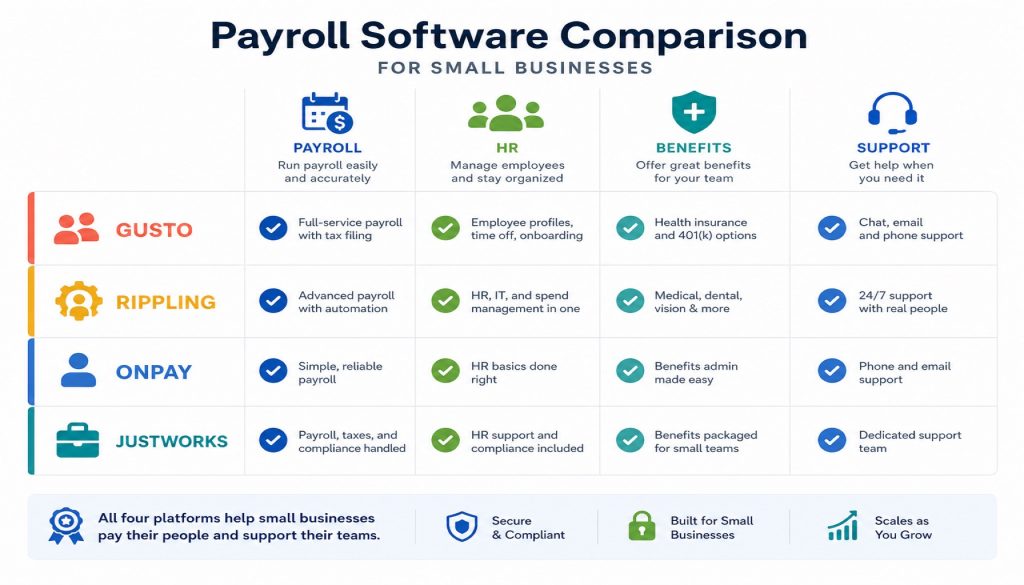
The Quick Comparison
| Category | Gusto | Rippling | OnPay | Justworks |
|---|---|---|---|---|
| ,- | ,- | ,- | ,- | ,- |
| Starting price | $49/mo + $6/person | $8/person + $35 base (platform only) | $40/mo + $6/person | $8/person (Payroll only) / $59/person (PEO Basic) |
| Monthly cost at 20 people | $169 | ~$195 (platform + Payroll module) | $160 | $160 (Payroll only) / $1,180 (PEO Basic) |
| G2 rating | 4.6/5 (11,200+ reviews) | 4.8/5 (12,500+ reviews) | 4.8/5 (700+ reviews) | 4.6/5 (1,120+ reviews) |
| Capterra rating | 4.6/5 | 4.9/5 | 4.8/5 | 4.6/5 |
| State coverage | All 50 US states | All 50 US states + 185 countries | All 50 US states | All 50 US states |
| Core positioning | Simple payroll + basic HR | Full-stack HR + IT + Finance platform | High-value all-inclusive payroll | PEO model with strong benefits |
| Integrations | 100+ | 500+ | 40+ | 30+ |
| Support channels | Phone/email/chat | Chat/email | Phone/email/chat | Phone/email/Slack |
| Best for | 1-50 people, straightforward needs | 10-2000 people, scaling fast | 1-50 people, budget-conscious | 5-100 people, need benefits packages |
Gusto: The Default Small Business Pick
Gusto is the most recognized payroll platform for US small businesses in 2026, ranking first for satisfaction on G2. The pitch is simplicity: most teams go from signup to first payroll run in under 30 minutes.
Pricing (updated March 2026):
- Simple: $49/mo + $6/person/mo (basic payroll + auto tax filing)
- Plus: $80/mo + $12/person/mo (adds PTO tracking, basic HR tools)
- Premium: $180/mo + $22/person/mo (dedicated support, advanced analytics)
- Contractor Only: $35/mo + $6/person
A 20-person team on Simple pays $169/month. On Plus, that jumps to $320. Note that Simple went from $40 to $49 in March 2026, a 22.5% increase.
Where it works well:
The interface is designed for people without HR backgrounds. Auto tax filing covers all 50 states with high accuracy. It connects to QuickBooks, Xero, FreshBooks, Expensify, and 100+ other apps. Employees get a self-service portal for pay stubs, W-2s, and personal info updates. The AutoPilot feature runs payroll without manual intervention.
Where it falls short:
Gusto has a clear ceiling. Once your needs extend beyond payroll and basic HR, you’re looking elsewhere. Multi-state setup can trigger extra fees. The price jump from Simple to Plus is steep. There’s no device management, no IT provisioning, nothing for the modern distributed team’s operational needs. Support response times stretch to 24-48 hours during peak periods.
Best fit: Teams of 10-50 whose primary requirement is “pay people on time, file taxes automatically” without needing a full HR platform.
Rippling: The Everything Platform
Rippling is not just a payroll tool. It’s a unified system that bundles HR, IT, and Finance into one surface. On a new employee’s first day, Rippling can simultaneously provision email, configure a laptop, add the person to payroll, assign benefits, and set permissions. All automated.
Pricing (modular, add what you need):
- Base platform (Unity): $8/person/mo + $35 base fee. Includes the employee directory, onboarding/offboarding workflows, and analytics.
- Payroll module: Quote-based, typically $6-10/person/mo extra
- IT management module: Quote-based, roughly $8-12/person/mo
- Implementation fees: $1,500-$20,000 depending on team size and complexity
A 50-person team running HR + Payroll + IT easily exceeds $3,000/month. This is Rippling’s biggest catch: the entry price looks cheap, but stacking modules multiplies the bill fast.
Where it works well:
True unification across HR, Payroll, IT, and Finance means data flows between systems without CSV exports. Over 500 integrations (QuickBooks, Slack, Google Workspace, GitHub, and more). Global payroll in 185+ countries. Workflow Studio lets you build custom automation. Device management handles laptop provisioning and retrieval.
Where it falls short:
Pricing is opaque. You have to talk to sales for actual numbers. Module stacking drives costs up quickly. Implementation takes time, and smaller teams may find the system heavier than they need. Contracts are typically annual with limited flexibility. “Opaque pricing” is the most frequent criticism on G2.
Best fit: Teams of 20-200 scaling quickly, especially tech companies that need payroll, unified device management, app permissions, and automated onboarding/offboarding in one place.
OnPay: The Quiet Overachiever
OnPay is the least known of the four, but it carries the highest user ratings (4.8/5 on both G2 and Capterra). The strategy is dead simple: one plan, every feature included, transparent pricing.
Pricing (unchanged in 2026):
- Single plan: $40/mo + $6/person/mo
- Includes: unlimited pay runs, all-50-state tax filing, W-2/1099, HR tools, PTO tracking, direct deposit, benefits administration, multiple pay schedules
No hidden fees. No feature tiers. A 20-person team pays $160/month. A 50-person team pays $340/month. At this price point, there’s almost nothing comparable.
Where it works well:
Transparent pricing with everything bundled. Unlimited pay runs per month with no extra charge. Full 50-state auto tax filing with accuracy guarantees. Built-in HR document templates (offer letters, NDAs, policy templates). QuickBooks and Xero integrations plus multiple time-tracking tools. New accounts get hands-on guided onboarding from a real person.
Where it falls short:
The integration ecosystem is small (around 40 apps), well behind Gusto and Rippling. No international payroll. No device or IT management capabilities. The mobile experience is mediocre; it’s primarily a web-based tool. Brand awareness is low, meaning many buyers never even consider it.
Best fit: Budget-conscious businesses of 5-50 people who want full-featured payroll without paying for HR modules they won’t use. Particularly popular among accounting firms recommending tools to their clients.
Justworks: The Benefits-First Approach
Justworks differs from the other three in a fundamental way: its core product is a PEO (Professional Employer Organization). Your employees become “co-employed” by Justworks in a legal sense, which gives small companies access to enterprise-tier benefits pricing on health insurance, 401(k), parental leave, and more.
Pricing (2026):
- Payroll Only: $8/person/mo (just payroll, no PEO)
- PEO Basic: $59/person/mo (payroll + compliance + workers’ comp + onboarding)
- PEO Plus: $109/person/mo (everything in Basic + medical/dental/vision + HSA/FSA + mental health benefits)
- 100+ employees get volume discounts (Basic drops to ~$49/person, Plus to ~$79/person)
A 20-person team on PEO Basic pays $1,180/month. PEO Plus runs $2,180/month. Expensive on the surface. But if you shop for equivalent group health insurance on your own, you’ll easily spend $500+ per person per month. Justworks packs the complexity of benefits administration into a single line item.
Where it works well:
Small companies get big-company benefits pricing through the PEO structure. Compliance risk is shared with Justworks (workers’ comp, unemployment insurance, etc.). The employee onboarding experience and self-service portal are clean. Slack integration for support communication. Strong compliance management for multi-state remote teams.
Where it falls short:
The PEO model means giving up some employer autonomy. The standalone Payroll plan is bare-bones. The integration ecosystem is the weakest of the four (around 30 apps). Trustpilot ratings are dismal (1.7/5), with complaints focused on technical issues and difficulty exiting the PEO. Migration costs when leaving are high.
Best fit: Companies of 10-100 whose core problem is “we want to offer competitive benefits but can’t negotiate good rates alone,” and who are comfortable with the PEO co-employment model.
A Decision Framework That Actually Works
Stop overthinking this. Answer three questions:
Question 1: What’s your core requirement?
If you just need accurate payroll and automatic tax filing, move to Question 2. If you need HR + IT + device management unified in one system, go with Rippling. If you need enterprise-grade benefits (health, 401k) but your company is too small to negotiate good rates, go with Justworks PEO Plus.
Question 2: What’s your monthly budget (based on 20 people)?
Under $200/month points to OnPay ($160/month, everything included). Between $200-350/month fits Gusto Simple or Plus ($169-$320/month). No budget ceiling and you want maximum capability means Rippling.
Question 3: How much do you value simplicity?
If you’re a founder doubling as HR and don’t want to learn a complex system, choose Gusto or OnPay. If you have dedicated HR staff who can invest time in configuration, Rippling pays back that investment. If you want to outsource HR administration entirely, Justworks is built for that.
Quick-reference table:
| Your situation | Recommended choice |
|---|---|
| ,- | ,- |
| Budget-limited, just need solid payroll | OnPay |
| Want the simplest possible experience | Gusto Simple |
| Scaling fast, need unified management | Rippling |
| Want enterprise-tier benefits for a small team | Justworks PEO Plus |
| Under 10 people, contractors only | Gusto Contractor Only |
Two Migration Stories
DataFlow Labs (SaaS, San Francisco): Started with Gusto Simple in 2024 at 8 people, paying $88/month. Worked great. By 2025 they had 20 employees across California, Texas, and New York. Problems surfaced: each new state needed manual tax configuration, new hires required separate Google Workspace and Slack provisioning, and laptop distribution was entirely manual through IT.
After a month of evaluation, they moved to Rippling. Migration took 3 weeks (Rippling pulls historical data directly from Gusto). Monthly cost went from $169 to about $450 (platform + Payroll + IT modules). The CEO’s math: the IT labor savings plus onboarding automation saved over $800/month in staff time. The deciding factor wasn’t that payroll was broken. It was that everything around payroll needed a unified system Gusto couldn’t provide.
Greenleaf Commerce (eco-friendly home goods, e-commerce): 35 employees including 5 part-time warehouse staff. Previously on ADP at nearly $600/month with a clunky, dated interface.
They compared Gusto Plus ($500/month) against OnPay ($250/month). Both covered their requirements: multi-state tax filing, PTO tracking, direct deposit. They picked OnPay. The reasoning was straightforward: $3,000 saved per year with no meaningful feature gap.
The one compromise: their Shopify time-tracking data needed a Zapier bridge to reach OnPay, adding one extra step. For $3,000 in annual savings, that tradeoff was easy.
What’s Shifting in 2026
AI-assisted tax filing is table stakes now. Both Rippling and Gusto shipped AI-powered tax features in 2026 that auto-detect state changes, predict tax adjustments, and flag compliance risks before they become problems. This used to be a differentiator; now it’s a baseline expectation.
Multi-state compliance keeps getting harder. Remote work means one employee might work from three different states in a quarter. Twelve states updated their remote-work tax rules in 2026 alone. Whether your payroll tool tracks these changes automatically is now a direct compliance risk factor.
Global payroll is becoming relevant for smaller teams. Gusto offers global EOR through a Remote partnership at $599/person/month. Rippling supports 185+ countries natively. For any team with international contractors or expansion plans, this capability matters more each year.
PEO providers are expanding downmarket. Justworks launching an $8/person pure Payroll plan in 2026 signals a clear strategy: acquire users at the payroll level, grow with them, and upsell full PEO services as the company matures.
The Bottom Line
There’s no universal best choice here. There’s only the right match for your current stage. Tight budget, pick OnPay. Hate complexity, pick Gusto. Need a unified operational system, pick Rippling. Want someone else to handle benefits administration, pick Justworks. And don’t expect to pick once and be done. Most companies between 20 and 100 employees will switch payroll providers at least once as their needs change. That’s normal, not a failure of planning.
Related Reading
- Gusto vs Rippling vs OnPay vs Justworks: Best Payroll Software for Small Business in 2026
- Gusto vs Rippling vs OnPay vs Justworks: Best Payroll Software for Small Businesses in 2026
Stay updated with our latest AI insights