A $0.99 AI resolution or a $50/seat/month AI add-on. That single pricing difference tells you almost everything about how Intercom and Zendesk think about the future of customer support. One wants a machine to handle the conversation. The other wants a machine to make your human agents faster. Both approaches work. But they work for very different teams, and picking the wrong one will cost you a year of painful migration later.
This is the comparison I wish existed when my team was evaluating both platforms last quarter. No fluff, no “it depends on your needs” cop-outs. Concrete differences, real pricing math, and a clear framework for choosing.
Two Competing Philosophies
Zendesk has been around for 18 years. Over 100,000 companies run their support operations on it. The entire platform grew up around the ticket: structured, trackable, auditable. Every feature reinforces that model. Multi-tier routing, SLA tracking, internal collaboration threads, granular permissions. It is enterprise infrastructure for support teams, and it acts like it.
Intercom started from a completely different place. Since 2011, it positioned itself as a conversational platform. Not ticket processing, but talking to users. It began as a product messaging and onboarding tool, then expanded into full customer support. That DNA defines its AI strategy today: let the AI own the conversation itself, rather than helping a human process tickets about the conversation.
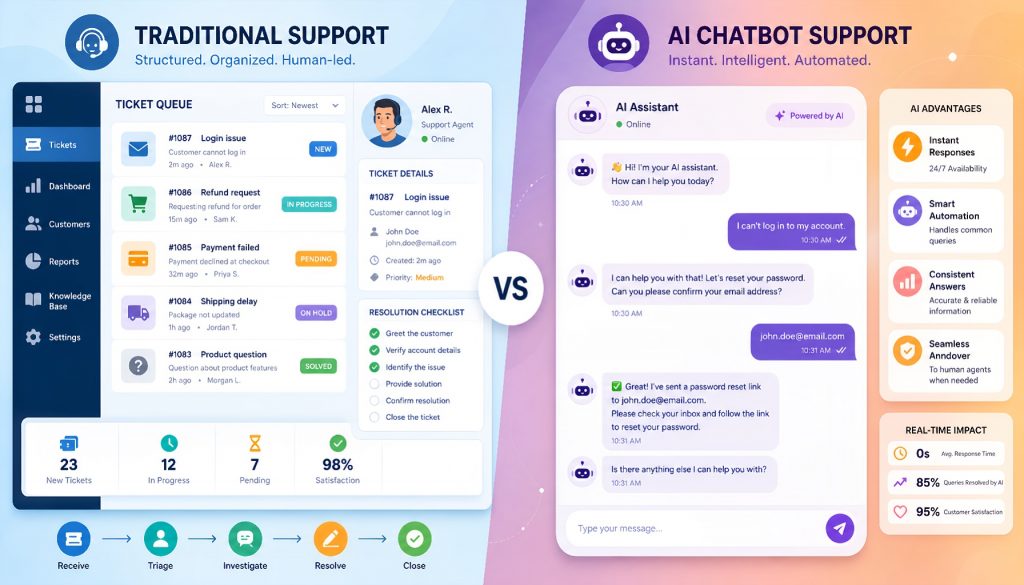
Here’s what this looks like in practice. A customer sends a refund request. In Zendesk’s world, that request becomes a ticket. It gets classified, routed, queued, assigned to an agent with the right permissions, and tracked against an SLA timer the entire time. In Intercom’s world, the Fin AI agent intercepts the conversation first. It checks whether automated refund conditions are met. If yes, it processes the refund without human involvement. If no, it hands off to a human, but the customer experiences one continuous chat thread throughout.
Neither approach is wrong. But one of them matches your team’s reality better than the other.
Feature Comparison at a Glance
| Dimension | Zendesk | Intercom |
|---|---|---|
| Core model | Ticket-based | Conversation-based |
| AI philosophy | Assist humans, boost efficiency | AI-first, autonomous resolution |
| AI bot product | AI Agent (formerly Advanced Bot) | Fin AI Agent |
| Self-service resolution rate | ~10-25% (official figures) | Claims 50%+ (customer case studies) |
| Channel coverage | Email, chat, phone, social, SMS | Chat, email, social, SMS (phone is weak) |
| Ticket/workflow depth | Extremely strong (multi-status, macros, triggers) | Moderate (conversation-flow oriented) |
| Knowledge base | Guide (mature, standalone module) | Articles (embedded, lighter) |
| Reporting | Explore (powerful, customizable) | Built-in reports (improving) |
| Best fit size | Mid to large (50+ agents) | Small-mid to mid-large (5-200 agents) |
| Starting price | $19/agent/month (Support Team) | $29/seat/month (Essential) |
The AI Divide: Assisting Humans vs. Replacing Them
This is the single most important factor for a 2026 purchasing decision.
Zendesk’s AI strategy is about making human agents more productive. Its AI capabilities layer across several functions: auto-classifying and routing tickets, recommending reply suggestions to agents, summarizing conversation history, and deflecting simple FAQ-type questions through bots. The AI Agent product (launched in 2025) improved self-service resolution noticeably, but the overall architecture still assumes humans make the decisions while AI handles prep work.
Intercom’s bet is bolder. Fin AI Agent is designed from the ground up to be the first responder. Not an assistant to humans, but a resolver of problems. Fin handles complex multi-turn conversations. It calls backend APIs to execute actions (checking order status, initiating refunds). It performs semantic search across your knowledge base to find answers. In published case studies, some customers report Fin autonomously resolving over 50% of all conversations. Half of customer interactions never touch a human.
But there’s a critical prerequisite that the marketing materials understate. Fin’s performance depends heavily on your knowledge base quality and the depth of your backend integrations. If your help docs have gaps, if your business logic requires nuanced judgment calls, if edge cases are common, your actual autonomous resolution rate might land at 20-30%. Zendesk’s advantage in that scenario: even when AI resolution rates are modest, its human workflow efficiency (routing, collaboration, SLA enforcement) remains best-in-class.
The practical takeaway is straightforward. If a large share of your support inquiries are repetitive and rule-based, Intercom’s AI-first approach can eliminate real headcount costs. If your tickets are complex, require cross-team judgment, and follow strict compliance paths, Zendesk’s “AI assists humans” model is more realistic about where the technology actually stands today.
Channel Coverage: Omnichannel vs. Chat-First
Zendesk’s multi-channel support is nearly unmatched in the market. Email, live chat, phone (Zendesk Talk), social media (Facebook, X, Instagram, WhatsApp), and SMS all work natively. Every channel feeds into the unified ticket system. For companies receiving customer requests across five or six different channels simultaneously, that single-pane-of-glass view is hard to replicate elsewhere.
Intercom excels at live chat and in-app messaging. Its Messenger widget feels noticeably smoother and more modern than Zendesk’s chat experience. Email and social media are supported too, but phone support has always been a weakness. You can bridge the gap with third-party integrations like Aircall or Dialpad, but native phone support doesn’t match what Zendesk Talk offers out of the box.
How much this matters depends entirely on your industry. SaaS companies and e-commerce brands do most customer interaction through chat and email. Intercom handles that perfectly. But if you’re in financial services, insurance, or healthcare, phone remains a primary (sometimes the primary) support channel. Zendesk has a clear edge there.
Daily Workflow: What Your Agents Actually See
The two platforms create fundamentally different day-to-day experiences for support staff.
Zendesk agents see a ticket queue. Each ticket carries a status (new, open, pending, solved), priority level, category tags, and an SLA countdown. Agents use macros (preset action templates) to handle common scenarios with a single click. They escalate tickets to specialist groups. They leave internal notes for cross-team discussion on complicated issues. The experience resembles operating a precision assembly line, and that’s intentional.
Intercom agents see a conversation inbox. On the left, a list of active conversations. On the right, conversation details and customer profile data. The workflow feels like using a messaging app: send a reply, insert a help article link, trigger a Workflow automation. There are fewer status fields to fill out, but that also means complex multi-department handoffs don’t have the same granular tracking that Zendesk provides.
A practical decision criterion: if your support manager needs minute-level visibility into every request’s processing status, needs complex routing rules, needs different permission levels for different agent tiers, Zendesk was built for exactly that. If your support team is smaller, more agile, and values response speed over process compliance, Intercom’s lighter design removes operational friction instead of adding it.
Pricing: Do the Full Math, Not the Sticker Price
The pricing structures are fundamentally different between these two platforms, and comparing monthly per-seat costs alone will mislead you.
Zendesk charges per seat with clear tiers:
| Plan | Price | What You Get |
|---|---|---|
| Support Team | $19/agent/month | Basic ticket management |
| Suite Growth | $55/agent/month | Multi-channel + knowledge base |
| Suite Professional | $115/agent/month | Advanced analytics, SLA, customization |
| Suite Enterprise | Custom pricing | Full enterprise package |
| Advanced AI add-on | +$50/agent/month | AI features on top of any plan |
Intercom restructured pricing in 2025:
| Plan | Price | What You Get |
|---|---|---|
| Essential | $29/seat/month | Core conversation management |
| Advanced | $85/seat/month | Automation, workflows, advanced features |
| Expert | $132/seat/month | Full platform with enterprise controls |
| Fin AI Agent | $0.99/resolution | Pay only when AI successfully resolves |
The critical difference is how AI gets billed. Zendesk charges the AI add-on per seat regardless of usage. You pay whether your agents use AI features ten times a day or never. Intercom’s Fin charges per successful resolution. You only pay when the AI actually solves a customer’s problem without human help.
If your AI autonomous resolution rate reaches 40% or higher, Intercom’s model becomes significantly cheaper per interaction. You’re paying $0.99 to replace what would cost $5-15 in human agent time. But if resolution rates stay low, Fin’s per-resolution fees become an additional cost on top of your seat licenses rather than a replacement for agent labor.
Real-world annual cost comparison for a 50-agent team:
Zendesk Suite Professional + Advanced AI: approximately $119,000/year.
Intercom Advanced + Fin (assuming 5,000 AI resolutions/month): approximately $110,000/year.
The headline numbers are close. But Intercom’s model has a compounding advantage: every additional AI resolution saves a human interaction. Over 12 months, if you invest in knowledge base quality and push resolution rates from 30% to 50%, your effective cost per support interaction drops meaningfully. Zendesk’s cost stays flat regardless of AI performance.
Migration Cost and Platform Lock-in
Most comparison articles ignore this, but it matters enormously for teams already running on one platform.
Zendesk accumulates lock-in fast. Historical ticket data, automation rules, macros, triggers, custom fields, reporting dashboards. After three or more years of use, the migration cost isn’t technical (APIs exist, data can be exported). The cost is rebuilding all your automation logic, retraining agents on new workflows, and accepting a temporary productivity dip during transition. This is why many companies complain about Zendesk but never actually leave. The sunk cost is real.
Intercom’s lock-in is lower by nature. Its automation logic is simpler, its data structures are flatter. But if you’ve invested heavily in Fin AI training with custom knowledge base content and fine-tuned conversation flows, that intellectual property doesn’t transfer cleanly to another platform either.
Regardless of which platform you choose, maintain an external document of your key automation rules and knowledge base architecture. Not because you plan to switch, but because it forces clarity about what your support logic actually is. Teams that can’t describe their automation rules outside the tool often don’t fully understand their own support processes.
When to Pick Zendesk
Zendesk is the right call when your team matches most of these conditions:
Your support team exceeds 50 agents with clear specialization tiers and defined escalation paths. Daily ticket volume runs in the thousands, requiring precise routing and SLA enforcement. Phone is a significant or primary support channel for your customers. Compliance requirements demand complete audit trails for every interaction. You’re already on Zendesk and the migration math doesn’t justify switching.
The companies getting the most from Zendesk in 2026 tend to be B2B SaaS with complex products (where tickets require investigation and cross-team collaboration), financial services firms (where audit trails and compliance are non-negotiable), and large e-commerce operations (where volume demands industrial-grade queue management).
When to Pick Intercom
Intercom is the right call when your team matches most of these conditions:
Customer interactions happen primarily through chat and in-app messaging. You’re committed to an AI-first strategy and willing to invest real effort in knowledge base optimization. Your support team is between 5 and 100 people. Your product is SaaS or e-commerce with a digitally native user base. You want your support tool to also handle product onboarding, feature announcements, and proactive messaging.
The companies thriving on Intercom in 2026 tend to be product-led SaaS businesses (where in-app messaging and self-service are natural), D2C e-commerce brands (where chat volume is high but questions are often repetitive), and fast-growing startups (where a smaller team needs AI to punch above its weight on resolution volume).
The Middle Ground: What About Alternatives?
If neither platform feels right, a few other options deserve attention.
Freshdesk covers similar ground to Zendesk at 30-40% lower cost, making it a strong pick for mid-market teams that need ticket management without enterprise pricing. Help Scout takes a minimalist approach that works well for email-primary support teams that don’t need workflow complexity. Kustomer (owned by Meta) has unique strengths in social commerce support. Front works well for teams that want shared-inbox simplicity with CRM-like customer context.
But if you need the combination of serious AI capability and enterprise-grade infrastructure in 2026, the top tier remains Zendesk and Intercom. The question is which type of AI you need: AI that makes your humans faster, or AI that handles conversations on its own. Answer that question honestly, and the platform choice becomes obvious.
Final Verdict
For teams where support complexity is high, agent count is large, and process control matters more than AI automation rate: Zendesk remains the safer, proven choice. Its AI capabilities are catching up, and the operational infrastructure is unmatched.
For teams where conversation volume is high, questions are frequently repetitive, and you’re willing to invest in making AI resolution work well: Intercom offers a fundamentally different economic model. When Fin works at scale, the cost savings are not incremental. They’re structural.
Pick the philosophy that matches your support reality today, not the marketing demo that looked coolest. Your agents are the ones who’ll live in that interface eight hours a day. Make the choice for them.
Related Reading
- Intercom vs Zendesk in 2026: Which One Actually Fits Your Support Team?
- Intercom vs Zendesk in 2026: Which One Actually Fits Your Support Team?
Stay updated with our latest AI insights