TL;DR
Postman wins for large teams needing robust collaboration and enterprise features, but Insomnia takes the crown for solo developers and small teams who value privacy, simplicity, and local-first workflows. If you’re tired of Postman’s forced cloud sync and cluttered interface, Insomnia offers a refreshing alternative—just don’t expect the same depth of team features.
What You’re Actually Choosing Between
Postman started as a Chrome extension back in 2012 and has grown into a full-blown API platform. It’s the 800-pound gorilla of API testing—feature-rich, widely adopted, and deeply integrated into many development workflows. But that growth came with baggage: a mandatory cloud account, an increasingly complex interface, and pricing that scales fast.
Insomnia emerged as the scrappy alternative focused on doing one thing well: testing APIs without the bloat. Acquired by Kong in 2019, it’s maintained its lean philosophy while gaining enterprise backing. The interface feels modern and uncluttered, and crucially, it respects your choice to keep everything local. Think of it as the developer-first option that hasn’t lost its way.
Interface and UX: Where You’ll Actually Spend Your Time
Here’s where opinions diverge sharply.
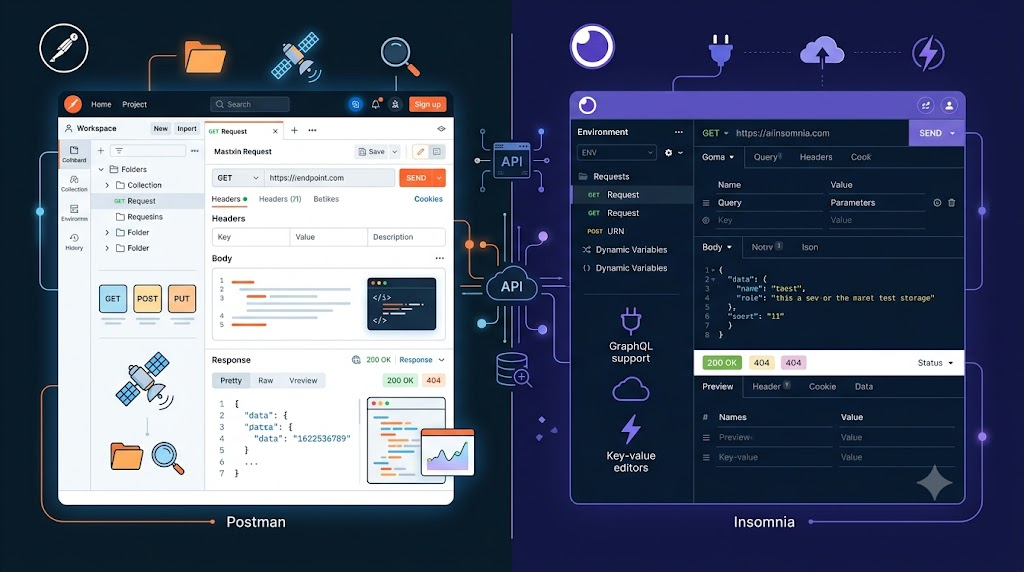
Postman’s interface is powerful but overwhelming. Open it for the first time and you’re greeted with tabs, panels, sidebars, and prompts to sign up for features you didn’t ask for. Yes, you can collapse panels and customize layouts, but the cognitive load is real. Veteran users have muscle memory; newcomers feel like they’re piloting a spaceship. The three-panel layout (sidebar, request builder, response) works once you know where everything is, but discoverability suffers when every feature competes for attention.
Insomnia went minimal and nailed it. The interface feels like what Postman should have been before feature creep set in. Clean typography, logical information hierarchy, and keyboard shortcuts that actually make sense. You’re not hunting through nested menus to find basic functionality. The request/response split is crystal clear. Even the dark theme looks good without feeling like a gimmick.
Bottom line: if you value aesthetics and ease of use, Insomnia wins. If you need every feature visible at once (and don’t mind the visual noise), Postman’s density might appeal to you.
Request Building and Testing: The Core Workflow
Both tools handle the basics competently—HTTP methods, headers, query parameters, body formats. Where they differ is in the details.
Postman offers more request types out of the box: REST, GraphQL, gRPC, WebSocket, even SOAP if you’re stuck maintaining legacy systems. The pre-request scripts and test scripts (written in JavaScript) are powerful, letting you chain requests, set variables dynamically, and run assertions. The learning curve is steep, but the flexibility is there. Auto-completion for environment variables is solid. The code generation feature (convert requests to code in 20+ languages) is genuinely useful for documentation or debugging.
Insomnia keeps it simpler but doesn’t skimp on essentials. REST and GraphQL are first-class citizens. The templating system using Nunjucks is elegant—you can inject environment variables, timestamps, or even JavaScript expressions inline without writing separate scripts. GraphQL support is actually better than Postman’s: schema auto-completion, query linting, and a cleaner explorer. Testing is less script-heavy, which some developers will see as a feature, not a bug.
Where Postman pulls ahead: if you need to automate complex workflows or integrate with third-party services via scripts, it’s more capable. Insomnia is better for straightforward API testing where you want less ceremony and more speed.
Team Collaboration: Where the Real Divide Appears
Postman built its business on team features, and it shows.
Workspaces let you organize collections and share them with specific team members. Roles and permissions are granular—viewer, editor, admin. The commenting system means you can discuss APIs directly in the context where they’re used. Version control is baked in: you can fork collections, merge changes, and resolve conflicts. Public workspaces let you share APIs with the world (or just your company). The Postman API Network is a searchable directory of public APIs with ready-made collections—useful for onboarding or exploring third-party services.
Then there’s the controversial part: all of this requires cloud sync. You can’t opt out anymore. Your requests, headers, and (hopefully sanitized) credentials live on Postman’s servers. For some teams, that’s a dealbreaker on security grounds alone.
Insomnia takes a fundamentally different approach. Collaboration exists, but it’s Git-native. You can sync workspaces to cloud storage (Insomnia Cloud or Insomnia Sync), but you can also just commit your workspace to Git and use your existing workflow. No forced accounts, no mandatory cloud sync. Team features exist in the paid tiers (shared workspaces, organizations), but they’re clearly optional.
The trade-off: Postman’s collaboration is seamless if you accept the cloud dependency. Insomnia’s is more manual but respects your infrastructure choices. Pick your poison based on your threat model and team size.
Offline and Local-First: Privacy and Control
Look, if privacy matters to you—and it should—this comparison isn’t even close.
Insomnia is offline-first by design. You can download it, never sign up for an account, and use it forever without phoning home. All your data lives in local JSON files or SQLite databases. Want to back up your work? Copy a folder. Want to version control? Commit to Git. No mysterious cloud syncs, no telemetry you can’t disable, no “oops, we had a service outage and now you can’t work.”
Postman used to allow this. Not anymore. You can technically use Postman offline after initial setup, but the app constantly nags you to sign in. The Scratch Pad mode exists as a local-only option, but it’s deliberately crippled—no syncing, no collaboration, and features are gated behind the cloud requirement. The message is clear: Postman wants you in their ecosystem.
For consultants working with sensitive client APIs, freelancers who travel frequently, or anyone in a regulated industry, Insomnia’s local-first philosophy is the obvious choice. Postman’s cloud lock-in is a non-starter.
API Documentation: Making Your Work Shareable
Postman has been pushing documentation hard. You can auto-generate docs from collections, customize them with markdown, and publish them to a public URL. The docs are interactive—readers can try API calls directly from the browser. For public APIs or partner integrations, it’s a polished solution. The automatic updates (when you change a collection, docs update) reduce maintenance overhead.
Insomnia’s documentation story is weaker. You can export collections to OpenAPI or Swagger specs, but there’s no built-in publishing platform. If you want interactive docs, you’ll need to pipe the spec into something like Redoc or Swagger UI yourself. For internal teams using existing doc tools, that’s fine. For public-facing documentation, Postman’s integrated solution is simpler.
Environment Management: Handling Multiple Configs
Both tools handle environments (dev, staging, production) with variable sets. Postman’s implementation is more mature: you can scope variables to collections, folders, or requests, and there’s a clear hierarchy for overrides. Bulk editing is available. The cloud sync means your team sees the same environments automatically (again, if you’re okay with that).
Insomnia’s environment system uses a nested JSON structure that’s more flexible but requires more manual setup. You can use Nunjucks templating to reference other variables or compute values on the fly. The base environment concept (variables available across all sub-environments) is elegant. But there’s no visual hierarchy view like Postman, so large environment files can get unwieldy.
Verdict: Postman’s UI makes environment management easier for large teams. Insomnia’s approach is more powerful for developers comfortable editing JSON.
Automation and CI/CD: Running Tests Without the GUI
Postman’s Newman is the standard here. It’s a CLI tool that runs Postman collections, outputs results in multiple formats (JSON, HTML, JUnit), and integrates smoothly with Jenkins, GitLab CI, GitHub Actions, and every other CI/CD platform. The ecosystem is mature: reporters, plugins, and community scripts exist for almost any workflow. If your QA team wants scheduled API monitoring, Postman Monitors (cloud-based scheduled runs) are built in.
Insomnia offers Inso, a CLI for linting, running tests, and exporting specs. It works, but the ecosystem is smaller. Integration examples are sparser. If you’re already committed to Insomnia and comfortable scripting your own CI pipelines, it’s fine. If you need plug-and-play automation with extensive documentation, Newman is the safer bet.
Pricing: Where Your Budget Goes
Here’s where Postman’s growth strategy shows its teeth.
Postman Pricing (2026):
- Free: 3 users, 1,000 collection runs/month, basic features
- Basic: $14/user/month (more collection runs, mock servers, monitors)
- Professional: $29/user/month (advanced collaboration, integrations, SSO)
- Enterprise: Custom pricing (starts around $49/user/month, dedicated support, compliance features)
For a 10-person team on Professional, you’re looking at $3,480/year. Enterprise pricing can balloon to $10K+ annually for mid-sized teams. The free tier is functional but limited enough that growing teams hit the paywall fast.
Insomnia Pricing (2026):
- Free: Unlimited personal use, local storage, all core features
- Team: $8/user/month (cloud sync, shared workspaces, version history)
- Enterprise: Custom pricing (SSO, compliance, support SLAs)
Same 10-person team? $960/year on the Team plan. The free tier is genuinely unlimited for solo use—no collection limits, no artificial caps. Even the paid tiers are cheaper than Postman’s equivalent.
The catch: Insomnia’s enterprise tier is less feature-rich than Postman’s. You’re paying less because you’re getting less. For teams that don’t need the full suite of Postman’s advanced features, that’s a feature, not a bug.
When to Use Postman
Choose Postman if:
- You’re on a large team (15+ developers) that needs granular permissions and formal workflows
- Your organization already uses Postman and has collections/scripts deeply embedded
- You need advanced automation with Newman and a mature CI/CD ecosystem
- Public API documentation with interactive examples is a core requirement
- Budget isn’t a primary concern and enterprise support is non-negotiable
- You’re working with multiple API protocols (gRPC, SOAP, WebSocket) beyond REST
Postman is the Swiss Army knife. It does everything, but you’re paying for features you might not use, and you’re locked into their cloud platform.
When to Use Insomnia
Choose Insomnia if:
- You’re a solo developer or on a small team (under 10 people) with simple collaboration needs
- Privacy and local-first workflows are non-negotiable
- You want a clean, distraction-free interface that doesn’t require a tutorial
- Your primary focus is REST and GraphQL (not edge-case protocols)
- Budget is tight and you don’t want to pay for features you’ll never use
- You already use Git for everything and want API testing to fit that model
- You’re willing to handle CI/CD integration with a bit more manual setup
Insomnia is the focused tool. It does API testing well without the bloat. If that’s all you need, you’ll appreciate the simplicity.
Final Verdict: Stop Overthinking It
Postman has become the enterprise standard for a reason—it’s comprehensive, polished, and battle-tested at scale. But its mandatory cloud sync, rising costs, and feature bloat have alienated developers who just want to test APIs without the ceremony.
Insomnia exists for those developers. It’s leaner, cheaper, and respects your privacy. The trade-off is less depth in team collaboration and automation. For most solo developers and small teams, that’s a trade worth making.
Here’s the real answer: try Insomnia first. You can download it, use it fully-featured for free, and never hand over an email address. If you hit a wall—maybe your team needs fine-grained permissions, or your CI/CD pipeline demands Newman—then evaluate Postman. But don’t assume you need the 800-pound gorilla just because everyone else uses it.
The best tool is the one that gets out of your way and lets you focus on the API, not the testing interface. For most developers reading this, that tool is Insomnia.
Stay updated with our latest AI insights