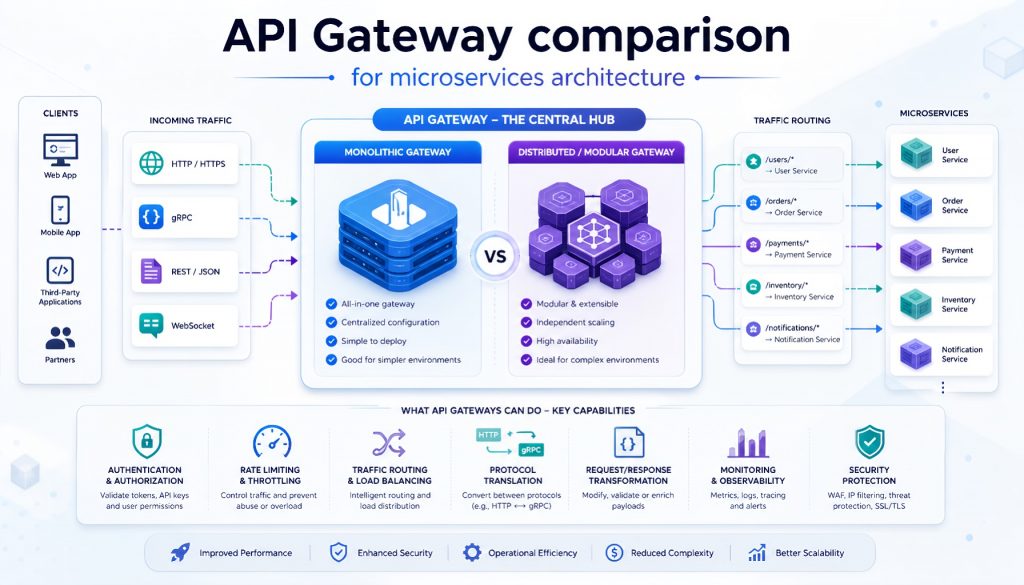
Once you split a monolith into 20+ microservices, a new problem surfaces fast: how do you route external traffic to the right service, enforce authentication, apply rate limits, and collect metrics without duplicating that logic in every service? The answer is an API gateway, a single entry point that handles cross-cutting concerns so your backend teams don’t have to.
The market has matured. In 2026, five options dominate the conversation: Kong, Tyk, KrakenD, Traefik, and AWS API Gateway. Each takes a different approach to the same problem, and each has tradeoffs that matter more than any feature checklist will tell you.
This piece breaks down what each tool does well, where it falls short, and which scenarios favor which gateway. The comparison is grounded in production behavior, not marketing copy.
Kong: The Plugin Ecosystem Veteran
Kong has been around since 2015, built on Nginx and OpenResty. Its main selling point is the plugin library: over 300 plugins covering OAuth2, JWT, LDAP authentication, sliding-window rate limiting with Redis clusters, logging integrations (Datadog, Splunk), and request/response transformation. If you need a capability, odds are someone already built a Kong plugin for it.
The workflow is straightforward. Need Prometheus metrics? Install the prometheus plugin and it auto-collects route-level latency, status codes, and throughput. Need canary releases? The canary plugin splits traffic by weight percentage. The community is active enough that most edge cases already have GitHub issues with working solutions.
Pricing: Open-source is free. Kong Enterprise starts at $3,000/month and adds RBAC, a developer portal, and advanced analytics. Small teams can run the open-source version for years without hitting walls. Enterprise makes sense when you need multi-tenant isolation or compliance audit logs.
Where it fits: Organizations running 50+ microservices with diverse requirements. One service needs OAuth2, another needs IP whitelisting, a third needs request body transformation. Kong’s plugin composition handles that heterogeneity well.
Where it hurts: Memory consumption is the main complaint. A single instance serving 100 APIs eats roughly 500MB of RAM. Configuration storage depends on PostgreSQL or Cassandra, so your gateway’s availability is coupled to your database’s availability. DB-less mode (declarative config) exists but doesn’t support dynamic modification; every change requires a restart.
Bottom line: Kong works best for teams that already have ops capacity to manage database clusters. If your engineering team is three people, Kong’s maintenance overhead will consume time you don’t have.
Tyk: The Go-Powered Middle Ground
Tyk is written in Go and benchmarks at roughly 12,000 req/s on a 4-core/8GB instance, about 30% faster than Kong under the same conditions. Beyond raw throughput, it ships with GraphQL federation, WebSocket proxying, and built-in API versioning.
The dashboard is where Tyk differentiates from Kong on developer experience. API creation, version switching, and analytics live in a single interface. The built-in developer portal generates documentation and handles API key provisioning out of the box, which saves you from building an admin panel from scratch. Rate limiting supports both Redis Sentinel and Redis Cluster for high-concurrency stability.
Pricing: Open-source is free. The managed cloud offering starts at $250/month. Enterprise (multi-datacenter, RBAC, custom plugins) starts at $1,500/month. That’s roughly half of Kong’s enterprise pricing for comparable features.
Where it fits: SaaS platforms that expose APIs to customers. If you need a developer portal where third parties can register, request API keys, and read auto-generated docs, Tyk gives you that without custom development.
Where it hurts: The plugin ecosystem is thinner than Kong’s. Custom plugins require Go or the gRPC plugin protocol (Python/Node.js), and debugging is less ergonomic than Kong’s Lua plugins. GraphQL support exists but doesn’t match Apollo Gateway’s query optimization maturity for complex federated schemas.
Bottom line: If your team’s primary language is Go, Tyk is the natural pick. Performance is solid, maintenance is lighter than Kong, and documentation is thorough. If you need heavy plugin customization, Kong’s ecosystem still has the edge.
KrakenD: The Stateless Performance Machine
KrakenD takes a radically different architecture approach: no database, no state, no cluster coordination. All configuration lives in a single JSON file. The gateway reads the file on startup and routes requests. That’s it. On a 16-core machine, benchmarks show 50,000 req/s with a p50 latency of 1.2ms.
The standout feature beyond raw speed is API aggregation. A single frontend request can fan out to multiple backend services in parallel. If your mobile app needs user profile data, order history, and product recommendations in one screen, KrakenD fires three parallel backend calls, merges the responses, and returns a single payload. It also supports response field filtering: if a backend returns 100 fields but the client only needs 10, KrakenD strips the rest at the gateway layer, saving bandwidth.
Pricing: Open-source is free. KrakenD Enterprise starts at $1,000/month, primarily for SLA guarantees and dedicated support. Compared to Kong and Tyk enterprise tiers, this is aggressive pricing for the performance you get.
Where it fits: Latency-sensitive systems. Game backends, IoT device gateways, high-frequency trading proxies. Any environment where backend services are stable and routing rules don’t change ten times a day.
Where it hurts: Static configuration means every change requires a service restart. The official “Flexible Configuration” feature (remote config loading) still applies changes on restart, not at runtime. There’s no management UI; all configuration is hand-written JSON, which creates a steep learning curve and a high error rate without tooling. Plugins are compiled into the binary (Go), so extending functionality means rebuilding the gateway.
Bottom line: KrakenD is the right tool when raw performance is a hard requirement and your routing topology is relatively stable. If you modify routes daily, the restart cycle will drive your team crazy. Pair it with GitOps and CI/CD pipelines to manage the JSON config; manual edits are too error-prone for production.
Traefik: The Cloud-Native Automation Layer
Traefik was designed for the container era. It integrates deeply with Kubernetes, Docker Swarm, and Consul for automatic service discovery. Add an annotation to a Kubernetes Service, and Traefik picks it up as a route. No manual configuration. Deploy a new microservice, and Traefik detects it automatically. Decommission a service, and it’s removed from routing. It also handles Let’s Encrypt certificate provisioning and renewal without operator intervention.
Where it fits: Kubernetes environments with frequent deployments and small DevOps teams. If you’re running 30 microservices with multiple deploys per day, Traefik’s automatic discovery eliminates a significant operational burden. Multi-protocol support (HTTP, TCP, UDP, gRPC) and native WebSocket/HTTP2 handling cover most modern workloads without additional configuration.
Pricing: Open-source is free. Traefik Enterprise starts at $3,000/month and adds distributed rate limiting, API management features, and advanced monitoring. Most teams running standard Kubernetes workloads won’t need the enterprise tier.
Where it hurts: Enterprise features are weak in the open-source version. No fine-grained access control, no audit logging. Rate limiting relies on middleware configuration that’s more complex than Kong’s plugin model. Performance tops out around 11,000-12,000 req/s, well below KrakenD’s ceiling.
Bottom line: If you’re running Kubernetes, Traefik should be your default consideration. The automatic service discovery paired with Ingress Controller functionality is hard to beat for operational simplicity. If you’re still deploying on VMs, Traefik’s core advantages don’t apply, and you’re better served by Kong or Tyk.
AWS API Gateway: Managed Simplicity with Lock-In
AWS API Gateway is a fully managed service. No servers to provision, no high-availability configuration, no patches to apply. You create APIs, configure routes, and set rate limits through the AWS console. Integration with Lambda, DynamoDB, and Cognito is native, making it the path of least resistance for serverless architectures on AWS.
Pricing: REST APIs cost $3.50 per million requests plus $0.09/GB for data transfer. HTTP APIs (a lighter-weight variant) cost $1.00 per million requests. Below 10 million monthly requests, it’s cheaper than running your own gateway. Above that threshold, self-hosted options become more economical. VPC Links for private integrations add $0.01/hour per connection ($7.20/month each).
Where it fits: AWS-native startups with backend services running on Lambda or ECS. Small teams without dedicated operations staff benefit most from the zero-maintenance model. Stage management (dev/test/prod) and canary deployments come built-in.
Where it hurts: Vendor lock-in is the primary risk. Migration costs are high once your API definitions, authorizers, and integrations are embedded in AWS-specific constructs. Cold-start latency ranges from 10-500ms, which disqualifies it for ultra-low-latency use cases. Custom extensibility is limited to Lambda authorizers and request validators; there’s no plugin system.
Bottom line: For teams fully committed to AWS with modest traffic volumes and no multi-cloud requirements, API Gateway eliminates operational overhead at a reasonable cost. If you anticipate needing fine-grained performance tuning or multi-cloud portability, self-hosted gateways offer more flexibility.
Decision Framework
| Scenario | Recommended | Rationale |
|---|---|---|
| Diverse plugin requirements | Kong | 300+ plugins cover most edge cases |
| External-facing APIs with developer portal | Tyk | Built-in portal and key management |
| Ultra-low latency / high throughput | KrakenD | 50,000 req/s, 1.2ms p50 latency |
| Kubernetes with frequent deploys | Traefik | Automatic service discovery, cert management |
| AWS-native serverless stack | AWS API Gateway | Native Lambda/Cognito integration, zero ops |
| Team under 5 engineers | Tyk or Traefik | Lower operational overhead, accessible docs |
| Multi-tenant isolation required | Kong Enterprise or Tyk Enterprise | RBAC and audit logging |
Performance Benchmarks
Test environment: AWS c5.2xlarge (8 vCPU, 16GB RAM), single-instance, 100 configured routes.
| Gateway | Throughput (req/s) | p50 Latency | Memory (100 routes) |
|---|---|---|---|
| KrakenD | 50,000 | 1.2ms | 100MB |
| Tyk | 12,000 | 3.8ms | 300MB |
| Traefik | 11,000 | 4.1ms | 150MB |
| Kong | 9,000 | 5.2ms | 500MB |
| AWS API Gateway | Managed (AWS-scaled) | ~15ms (includes cold start) | N/A |
KrakenD’s 4x throughput advantage and 5x lower memory footprint are striking, but remember that raw gateway performance rarely becomes the bottleneck in production. Your database queries and service logic will saturate long before the gateway does. The performance gap matters most in edge cases: IoT ingestion, real-time gaming backends, or financial systems where every millisecond of added latency has a dollar cost.
Making the Call
There’s no universal answer here. The right gateway depends on three things: your team’s operational capacity, your deployment environment, and how often your routing topology changes.
Kong handles complexity well but demands infrastructure investment. Tyk balances performance with usability and costs less. KrakenD delivers unmatched speed but trades away runtime flexibility. Traefik automates away operational pain in Kubernetes but underdelivers outside that context. AWS API Gateway removes ops entirely but ties you to a single vendor.
Run a proof-of-concept with the open-source version for two weeks before committing to an enterprise tier. API gateways sit in the critical path of every request; migrating away from a bad choice is expensive and disruptive. Spending an extra week on evaluation is cheap insurance.
One more thing worth remembering: the gateway is infrastructure, not architecture. A well-configured gateway won’t save you from poorly designed services. Get the service boundaries and data flow right first. The gateway choice follows from there.
Related Reading
- API Gateway Showdown 2026: Kong vs Tyk vs KrakenD vs Traefik vs AWS
- API Gateway Comparison 2026: Kong vs Tyk vs KrakenD vs Traefik vs AWS
Stay updated with our latest AI insights