Botpress Studio’s V12 update made building chatbots feel like writing code. Flows, cards, hooks, environment variables, CORS configs, PostgreSQL setup. If your team has a dedicated backend developer who enjoys YAML files, that’s fine. But product managers who just need a customer support bot shouldn’t spend two days reading documentation before they can ship anything.
Self-hosting gives you data control, which matters for compliance. The tradeoff is operational overhead that many teams don’t budget for. If you’ve hit that wall, here are five alternatives worth evaluating across four criteria: ease of use, pricing transparency, AI model support, and integration depth.
Where Botpress Works (and Where It Doesn’t)
Botpress supports 100+ languages, deploys to any cloud, and gives enterprises full data sovereignty. For regulated industries that need on-prem deployment, it remains a strong option.
The problems show up in daily use. The visual editor became secondary to code-like configuration in V12+. Non-technical team members can’t participate in bot design without developer hand-holding. Community support on the open-source version is slow compared to commercial competitors. Enterprise support requires a paid plan.
The five tools below each solve a specific pain point that Botpress creates for certain teams.
Voiceflow: Built for Product Teams, Not Engineers
Voiceflow treats conversation design the way Figma treats interface design. You drag question cards, logic branches, and API calls onto a canvas, connect them with lines, and the flow is defined. No code, no config files.
The collaboration angle is what separates it from other visual builders. Product managers, designers, and copywriters can comment, annotate, and co-edit bot flows in real time. This means the people who understand customer problems can directly shape the bot’s behavior without filing tickets for the dev team.
AI integration is straightforward: plug in your OpenAI, Anthropic, or Google API key. Voiceflow handles prompt optimization, context window management, and fallback logic. Testing happens inside a built-in simulator, so you can debug conversation branches without deploying to production.
Pricing: Free tier (2 projects, 1,000 conversations). Pro at $40/month (unlimited projects, 20,000 conversations, team collaboration). Enterprise adds SSO and private deployment.
Best for: Customer support automation, product demos, and sales assistants where non-technical stakeholders need to iterate on bot behavior directly.
The tradeoff vs. Botpress: No self-hosting option. You’re trading data sovereignty for the smoothest visual editing experience available today.
Rasa: Full Control for Python Teams
Rasa is a pure code framework. 100% Python, fully open-source, with every model and data point under your control. Banks, healthcare systems, and government agencies choose Rasa because their compliance teams won’t allow conversation data leaving local infrastructure.
The customization depth is extreme. You can write your own NLU training data, adjust intent classification thresholds, plug in Hugging Face Transformers, and modify the dialogue management engine’s source code. Deployment options range from Docker containers to Kubernetes clusters to a Raspberry Pi in a closet.
The Python ecosystem advantage is real for teams already working in that stack. Integration with Pandas, SQLAlchemy, FastAPI, and other common libraries is native.
The cost: Two weeks minimum from zero to production. You need to understand YAML config structures, write conversation stories as training samples, configure NLU pipelines, and debug action servers. There’s no visual editor to fall back on.
Pricing: Open-source is free. Rasa Pro (enterprise analytics, version management) requires contacting sales.
Best for: Teams with dedicated Python developers who need total data control and the ability to customize every layer of the NLU stack. Finance, healthcare, and government projects with strict data residency requirements.
The tradeoff vs. Botpress: More low-level. Botpress still provides a Studio interface; Rasa gives you VSCode and YAML files. You gain complete control but lose any pretense of accessibility for non-developers.
Chatbase: Upload Docs, Get a Bot in 5 Minutes
Chatbase compresses the entire “build a knowledge base chatbot” workflow into a single step. Upload your PDFs, Docx files, web links, or plain text. Chatbase extracts the content, vectorizes it, builds a knowledge base, and generates answers using GPT-4 or Claude.
No intent definitions. No conversation flows. No rule writing. The AI answers user questions based on your document content. That’s it.
The deployment is two lines of JavaScript pasted into your site’s tag. It supports 80+ languages with automatic detection and switching. Answer quality depends on two things: how good your source documents are, and which LLM you select (GPT-4 produces better results than GPT-3.5 in most cases).
Pricing: Free (20 messages/month, 1 chatbot). Hobby $19/month (2,000 messages, 5 chatbots). Standard $99/month (10,000 messages, unlimited chatbots).
Best for: Document Q&A, customer support over existing knowledge bases, and internal wikis where the content already exists and just needs a conversational interface.
The tradeoff vs. Botpress: No flow control. You can’t design multi-turn logic like “collect email, then recommend product based on answers.” The AI free-styles based on your documents. If structured conversation paths matter to you, Chatbase isn’t the right fit.
Typebot: Open-Source Forms That Talk
Typebot sits at the intersection of Typeform and chatbot builders. The visual editor lets you drag text messages, multiple-choice buttons, conditional branches, and variable assignments into a flow. Connect the pieces and you have conversational logic that collects structured data.
Where Typebot excels is downstream automation. A single flow can: ask the user to select a product type, display different pricing based on their choice, collect an email address, write the data to Google Sheets, and trigger a Zapier workflow. All configured visually.
Integration options include webhooks (HTTP requests to any API), native Google Sheets writing, Zapier/Make connectors (5,000+ app integrations), and OpenAI API calls for generating dynamic responses. Self-hosting requires only Docker Compose and a PostgreSQL database.
Pricing: Open-source version is free (self-hosted). Cloud-hosted starts at $39/month (includes hosting, custom domain, branding removal).
Best for: Lead qualification forms, market research surveys, appointment booking, and any scenario where you need to collect structured information through a conversational interface and push it to other tools.
The tradeoff vs. Botpress: More intuitive visual editor, but weaker AI capabilities. Think of it as “conversational forms” rather than “intelligent customer service.” If your primary need is data collection with conditional logic, Typebot is the better open-source option.
Flowise: Visual LangChain for AI Engineers
Flowise is what happens when you put a drag-and-drop interface on top of LangChain. If you already understand chains, agents, tools, and memory in the LangChain framework, Flowise lets you assemble these components visually instead of writing Python.
The model support is broad: OpenAI GPT-4, Anthropic Claude, open-source models (Llama, Mistral), and locally deployed Ollama instances. Vector database integration covers Pinecone, Weaviate, Qdrant, and Supabase Vector. This means you can build full RAG (Retrieval-Augmented Generation) applications: upload documents, chunk them, vectorize, store in a database, retrieve relevant chunks at query time, and feed them to an LLM for answer generation.
Fully open-source with simple Docker deployment. Flowise Cloud is still in beta; the self-hosted version is free.
Best for: AI engineers building complex LLM applications that involve multi-step reasoning, tool calling, and knowledge base retrieval. Rapid prototyping of RAG pipelines.
The tradeoff vs. Botpress: Flowise targets AI engineers, not chatbot builders. If you want a simple customer support bot, Flowise’s learning curve isn’t lower than Botpress. But if you’re building LLM applications with retrieval and reasoning, it’s the fastest way to prototype without writing boilerplate.
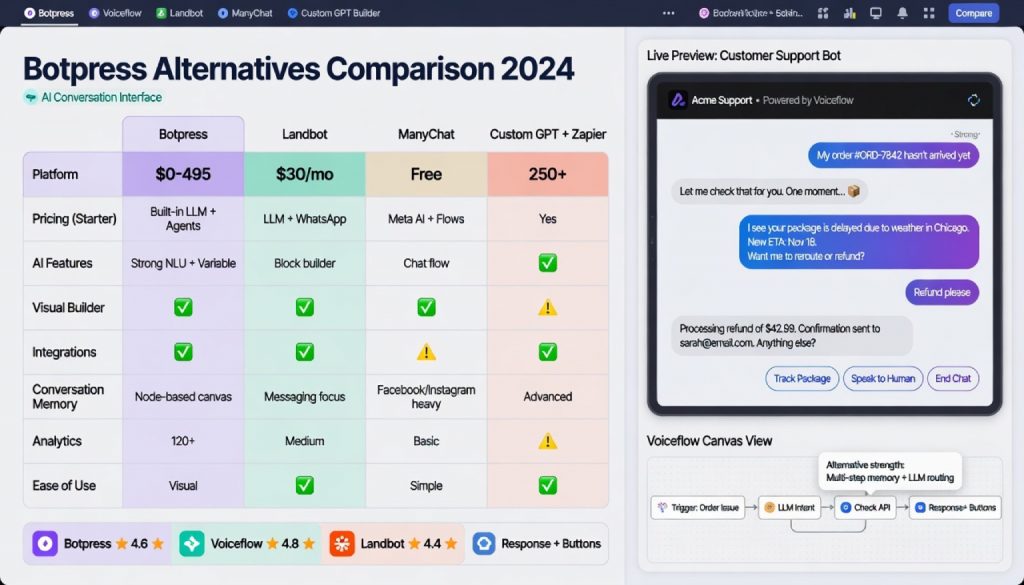
Side-by-Side Comparison
| Tool | Starting Price | Learning Curve | Self-Hosting | AI Model Support | Best User Profile | Integration Ecosystem |
|---|---|---|---|---|---|---|
| Voiceflow | Free / Pro $40/mo | Low (drag-drop) | No | GPT/Claude/Gemini | Product managers, non-tech teams | ⭐⭐⭐⭐⭐ |
| Rasa | Free (open-source) | High (code-driven) | Yes | Custom NLU | Python developers | ⭐⭐⭐⭐ |
| Chatbase | Free / $19/mo+ | Very Low (upload-and-go) | No | GPT-4/Claude | Teams needing fast deployment | ⭐⭐⭐ |
| Typebot | Free (open-source) / $39/mo | Low (visual) | Yes | OpenAI API | Market research, form collection | ⭐⭐⭐⭐ |
| Flowise | Free (open-source) | Medium (requires LangChain knowledge) | Yes | Multiple LLMs | AI engineers | ⭐⭐⭐⭐⭐ |
How to Pick
Your team has no developers and needs something working this week. Go with Voiceflow. The visual editor requires zero technical background, and the collaboration features mean product and design can own the bot without engineering support.
You need full data control and have a Python team. Go with Rasa. 100% open-source, deployable anywhere, and built for industries where data can’t leave your infrastructure.
You already have documentation and just want it to answer questions. Go with Chatbase. Upload your content, embed two lines of JavaScript, done. Five minutes from start to live.
You want open-source plus visual editing for form-style conversations. Go with Typebot. The drag-drop editor handles conditional logic and integrates with Google Sheets, Zapier, and webhooks out of the box. Docker one-click deploy for self-hosting.
You’re building RAG applications and already know LangChain. Go with Flowise. Visually assemble retrieval pipelines with multiple LLMs and vector databases. The fastest path from concept to working prototype for AI engineers.
Bottom Line
Botpress is still a capable open-source chatbot platform, especially for enterprises that need self-hosting and multi-language support. But it tries to serve everyone, which means it serves some teams poorly.
Each of these five tools made a deliberate choice about who they’re for. Voiceflow chose product teams. Rasa chose developers who want total control. Chatbase chose speed over flexibility. Typebot chose structured data collection. Flowise chose AI engineers building LLM applications.
Pick the tool that matches how your team actually works, not the one with the longest feature list. The 2026 chatbot market has enough specialization that you don’t need to fight a general-purpose platform into doing what a focused tool handles natively.
Stay updated with our latest AI insights