LaunchDarkly built the feature flag category. It also built the pricing model that makes engineering managers wince during budget season. Per-seat licensing, MAU-based billing, and modular upsells for experimentation and SSO push annual contracts past $40,000 for mid-size teams. Once you’re in, migration costs keep you there.
The frustration is well-timed. Feature flags stopped being optional around 2023. Progressive rollouts, kill switches, A/B testing, remote configuration: these are table stakes for any team shipping software weekly. The good news is that the market caught up. Five credible alternatives now cover the spectrum from open-source self-hosted to warehouse-native analytics platforms, each with a meaningfully different philosophy about what a feature flag tool should do.
This breakdown covers PostHog, Flagsmith, Unleash, DevCycle, and Statsig. The goal is straightforward: help you figure out which one fits your team’s constraints on budget, compliance, experimentation maturity, and engineering culture.
The Comparison at a Glance
| Dimension | PostHog | Flagsmith | Unleash | DevCycle | Statsig |
|---|---|---|---|---|---|
| Free tier | 1M flag requests/mo | 50K requests/mo | Unlimited (self-hosted) | 1,000 MAU | Unlimited flag checks |
| Paid starting at | Usage-based | $40/mo | $80/mo | $500/mo | $150/mo |
| Deployment | Cloud / Self-hosted | Cloud / Self-hosted | Cloud / Self-hosted | Cloud only | Cloud / Warehouse-native |
| SDK languages | 15+ | 15+ | 15+ | 14+ | 15+ |
| A/B testing | Built-in stats engine | Basic | Requires external tool | Yes | Built-in stats engine |
| Remote config | Yes | Yes | Yes | Yes | Yes |
| SSO/SAML | Enterprise | Enterprise | Enterprise | Enterprise | Enterprise |
| Audit logs | Yes | Scale-Up+ | Yes | Yes | Yes |
| OpenFeature | Provider | Provider | Provider | Native | Provider |
| Open source | MIT | BSD-3-Clause | Apache-2.0 | SDK only | No |
PostHog: The All-in-One Play
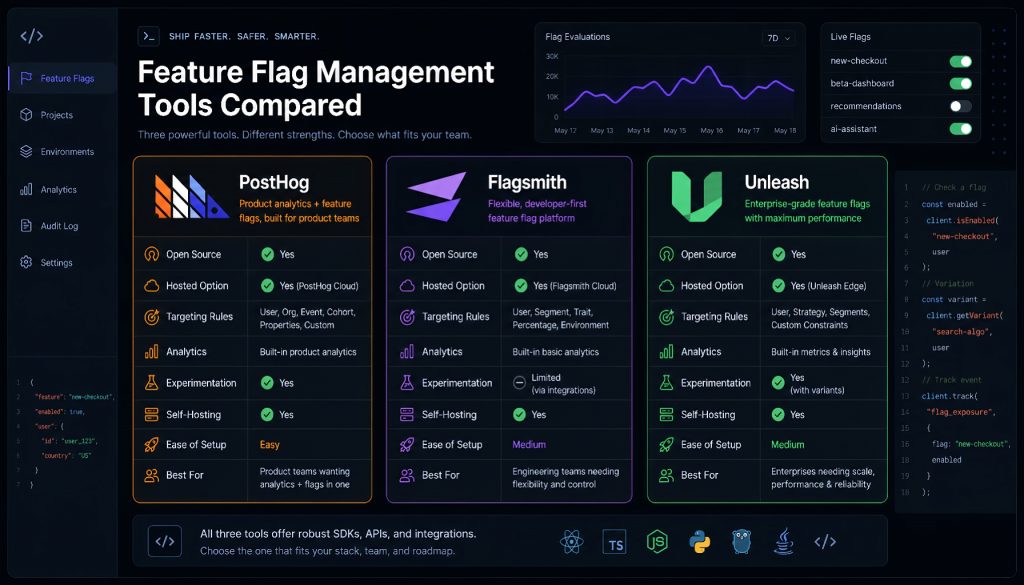
PostHog started as an open-source product analytics tool and expanded into feature flags, session replay, and experimentation. The thesis is simple: if you’re running a flag, you want to measure its impact in the same interface. No Segment pipeline, no Amplitude integration, no stitching user IDs across three vendors.
The free tier gives you 1M flag requests per month. Overage pricing sits at $0.0001 per request. For a B2B SaaS with 5,000 DAU, that free allocation covers production comfortably. The enterprise tier starts at $2,000/month and adds SOC 2 and HIPAA compliance support.
Where PostHog pulls ahead: multivariate testing is built in, so you can run A/B/C/D experiments without bolting on a separate tool. The analytics integration means you see conversion funnels and retention curves directly tied to flag states.
Where it gets tricky: billing is request-based, and high-concurrency consumer apps can burn through allocation fast. Local evaluation mode reduces API calls but counts each local eval as 10 requests. For a mobile app with 100K DAU polling flags on every screen load, do the math before committing.
Best for: Product teams that want flags, analytics, and experimentation in one subscription. Particularly strong for teams under 50 engineers who don’t want to manage three separate vendor contracts.
Flagsmith: Data Sovereignty Without the Complexity
Flagsmith does one thing well: feature flags and remote configuration. No analytics suite, no session replay, no experiment engine. BSD-3-Clause open source, self-hostable at zero cost, with no feature gating between the free and paid versions.
The cloud pricing is approachable. Start-Up tier runs $40/month for 1M requests and 3 team members. Scale-Up moves to $50/month for 5M requests. Overage sits at $7 per 100K requests. The self-hosted version has no usage limits at all.
For teams in regulated industries (financial services, healthcare, government), the self-hosted option solves the data residency question completely. Your flag evaluation data never leaves your infrastructure. Audit logs are available from Scale-Up tier onward, and SAML comes with the Enterprise plan.
The gap: A/B testing is rudimentary. Flagsmith doesn’t have a built-in statistics engine for experiment analysis. If you need rigorous experimentation, you’ll pair it with Amplitude, Mixpanel, or a warehouse-based analysis tool. That’s a deliberate product choice, not an oversight. Flagsmith bets that most teams want clean flag management first and will bring their own analytics stack.
Best for: Teams with strict data compliance requirements (GDPR, SOC 2, HIPAA) who need self-hosted flag management without paying enterprise prices. Also a solid choice for startups that want a simple, affordable flag tool without feature bloat.
Unleash: The Battle-Tested Open Source Option
Unleash has been around since 2015. That longevity matters: GitLab runs it internally, the Norwegian Labour and Welfare Administration (NAV) uses it for citizen-facing services, and it has 13,000+ GitHub stars with an active contributor community. When an open-source flag tool has survived a decade of production use at government scale, the reliability question is answered.
The open-source edition is fully functional with no usage caps. The hosted Pro tier costs $80/month for 5 seats. Enterprise pricing starts at $75 per seat per month (annual billing) and adds SSO, custom roles, and SLA guarantees.
Unleash’s strength is governance. RBAC is granular, audit logs cover every flag change with full context, and the approval workflow for flag changes fits organizations where compliance teams need sign-off before production changes go live. Strategy constraints let you combine multiple targeting dimensions (geography, user attributes, percentage rollout) in a single flag rule.
The architecture trade-off: Unleash uses polling, not push. Default polling interval is 15 seconds, meaning flag changes propagate with a delay. For most B2B applications, 15 seconds is irrelevant. For real-time consumer features (think: showing a flash sale banner the instant it goes live), you’d need to tune the interval down or look elsewhere. Also notable: Unleash has no built-in experimentation. It manages flags. You bring the analytics.
One operational note: the OSS Edge component is scheduled for deprecation in December 2026. If you’re running Edge in production, start planning the migration now.
Best for: Engineering organizations with 50+ developers who need compliance-grade flag management (SOC 2, ISO 27001) and already have a separate analytics/experimentation stack.
DevCycle: Performance-First, Standards-Native
DevCycle is the youngest entrant here, and it made an architectural bet that differentiates it sharply: local bucketing with edge-delivered configuration. Flag evaluation happens inside the SDK on the client side. No round-trip to a server on every check. Latency is sub-millisecond.
More significantly, DevCycle is the only platform in this comparison that’s OpenFeature-native from the ground up. Every SDK ships with a built-in OpenFeature provider. The practical implication: if you build on DevCycle and later decide to switch, your application code doesn’t change. You swap the provider, not the integration.
The developer experience tooling is notably deep. VS Code extension, CLI for flag management in CI pipelines, Terraform provider for infrastructure-as-code workflows, GitHub Actions integration, and built-in stale flag detection that alerts when flags haven’t been toggled in 30+ days.
The pricing trade-off is real. Free tier caps at 1,000 client-side MAU, which is tight. A SaaS product with even modest traction will outgrow it in weeks. Business tier jumps to $500/month for 100K MAU. That’s a steep step up compared to Flagsmith or Unleash’s pricing curves.
One strategic consideration: Dynatrace acquired DevCycle in 2025. The product direction has been stable since the acquisition, but enterprise buyers should evaluate whether the DevCycle roadmap will remain independent or converge with Dynatrace’s broader observability platform over time.
Best for: Teams where flag evaluation latency matters (gaming, real-time collaboration, high-frequency frontend rendering). Also strong for organizations that want vendor portability through OpenFeature standardization.
Statsig: Built for Experimentation Culture
Statsig’s founding team came from Facebook’s internal experimentation platform. The product philosophy reflects that origin: every feature should be an experiment, and the platform should make running experiments as easy as toggling a flag.
The pricing model is the most unusual in this group. Flag evaluations are free. Unlimited. All plans. You pay for analytics events instead. For teams that run heavy flag traffic but light instrumentation, this inverts the cost structure favorably compared to PostHog or DevCycle’s MAU-based billing.
The statistical engine is where Statsig separates from the pack. CUPED variance reduction (which can cut experiment duration by 30-50%), sequential testing for early stopping, automatic significance detection, and holdout groups that measure the cumulative impact of your entire experimentation program over time. These aren’t features you can bolt on with a third-party integration. They require deep integration between the flag system and the analysis layer.
The warehouse-native deployment option lets you keep all event data in your own Snowflake or BigQuery instance. Statsig’s computation layer runs on top of your warehouse rather than ingesting your data into their infrastructure. For organizations with existing data governance around their warehouse, this removes a major procurement blocker.
The billing caveat: if your product has high event density (e-commerce where every click fires an event, for example), the event-based model can get expensive quickly. And the free tier only retains data for one year.
Best for: Product organizations that run 50+ experiments per year and need statistical rigor beyond basic p-value checks. Particularly strong for teams with an existing data warehouse who want the computation to stay close to their data.
Decision Framework: Matching Tools to Constraints
The right choice depends on which constraint binds hardest for your team:
Budget is the binding constraint. PostHog’s free tier (1M requests) or Statsig’s unlimited free flag checks give you the most room before hitting a paywall. If you need self-hosted and zero cost, Unleash’s open-source edition has no usage limits.
Data residency and compliance are non-negotiable. Flagsmith or Unleash self-hosted. Both are fully functional without cloud dependencies. Flagsmith is simpler to operate; Unleash has deeper governance features for large organizations.
You already have an analytics stack and just need flags. Unleash or Flagsmith. Neither tries to replace your Amplitude or Mixpanel. They do flag management cleanly and stay out of the way.
Experimentation maturity is high and you need statistical rigor. Statsig. The built-in CUPED, sequential testing, and holdout measurement aren’t available in any other tool at this price point without building custom infrastructure.
Vendor lock-in is your primary concern. DevCycle’s OpenFeature-native architecture means your application code is decoupled from the provider. Switching later costs you a configuration change, not a codebase refactor.
You want one platform for flags, analytics, and experiments. PostHog if your team is under 50 engineers. Statsig if experimentation volume is high and you have a data warehouse.
Migration Considerations
Moving off LaunchDarkly isn’t painless, but it’s well-documented. DevCycle ships a dedicated Flag Importer tool. Unleash publishes a migration guide. The general sequence: export flag definitions from LaunchDarkly, recreate them in the new platform, run both SDKs in parallel during a transition window, validate behavior parity, then decommission the old integration.
One recommendation that applies regardless of which tool you choose: adopt the OpenFeature SDK as your abstraction layer. All five platforms in this comparison support OpenFeature (DevCycle natively, the others via providers). Building against the standard means your next migration, whenever it comes, is a provider swap rather than a re-integration.
For teams evaluating these options: start with the free tier. Run it in a staging environment for two weeks. The workflow ergonomics (how flag creation, targeting rules, and change approval feel in daily use) matter as much as the feature matrix. A comparison table tells you what’s possible. Two weeks of use tells you what’s practical.
Related Reading
- Best LaunchDarkly Alternatives in 2026: PostHog vs Flagsmith vs Unleash vs DevCycle vs Statsig
- Best LaunchDarkly Alternatives in 2026: PostHog vs Flagsmith vs Unleash vs DevCycle vs Statsig
Stay updated with our latest AI insights