A Monday that starts with empty columns
Dan runs the online store for a small home goods brand. Dan is invented, and so is the brand, but the morning he is having is one plenty of people would recognize without much help.
Nine o’clock on a Monday. He opens the pricing sheet and three of the competitor columns are blank. The scraper didn’t crash. The logs are a tidy column of 200s. What came back was a page that said, in effect, this product is no longer available. He spends the morning in the code before he finds it. The price moved out of span.price and into a div with a hash suffix on the class name. He fixes it and ships it. Three weeks later a different competitor rebuilds their frontend on a new framework, and the same job comes around a second time.
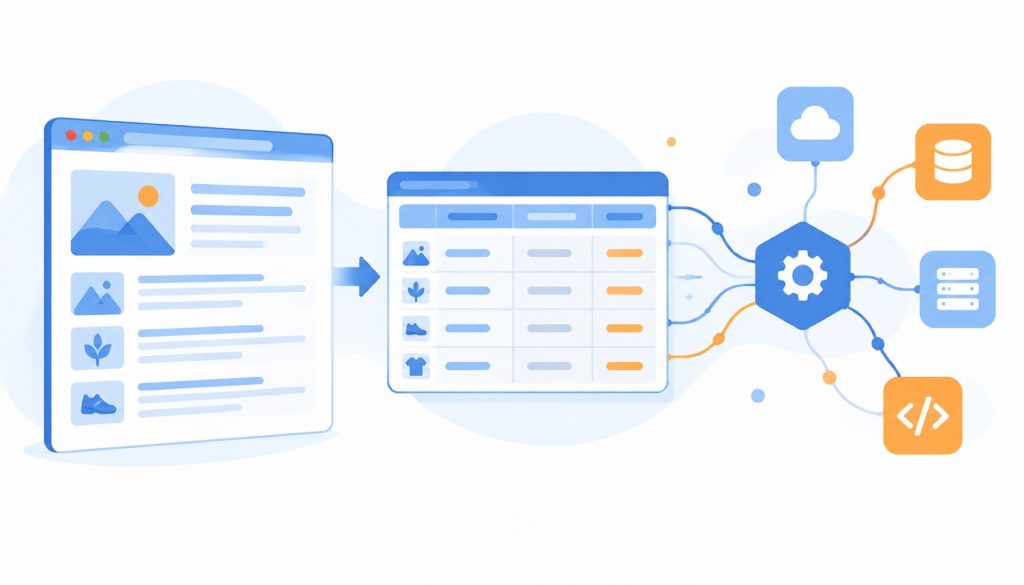
Anyone who runs ecommerce operations, market research, or a recruiting aggregator has been through this loop. A page is written to be looked at. An API is written to be called. The layer between them has no standard shape, and no version of it stays finished. What makes a hand-written scraper annoying is not the difficulty of writing one. It is that the whole thing rests on an assumption about what the page looks like, and that assumption has a shelf life nobody mentions at the start.
Over the past two years a category of tools has formed around exactly this seam. Point one at a page, get structured data back, wrapped as an API or dropped into a table. Maxun is one of the better known entries in that category. It is AGPLv3, carries close to 18,000 stars on GitHub (https://github.com/getmaxun/maxun), and lives at https://www.maxun.dev.
It splits scraping into five actions. Scrape turns a single page into Markdown, HTML, plain text, or a screenshot. Crawl follows links across a whole site. Extract pulls lists and tables into rows and columns. Search takes keywords, finds the pages, then scrapes them. Monitor runs on a schedule and tells you when the content changes. There are three ways in as well: click elements in a recorder, describe what you want in one sentence and let the AI mode find it, or call the API, SDK, CLI, or MCP server directly.
By the time you are actually choosing, though, the question is rarely whether Maxun is good. It is whether your situation fits Maxun better than it fits something else.
Four questions to settle before comparing anything
Scrape something once and any tool will do, including copy and paste. The hard case is daily, and accurate. In that case the outcome usually turns on four ordinary things rather than on scraping capability.
The first is where the data is allowed to live. Some companies have compliance rules that keep data inside their own network, which leaves self-hosting as the only option. Maxun’s repository ships a Docker Compose file and a local install path. The self-hosted version covers scrape, crawl, extract, search, monitoring, the API, the SDK, webhooks, and capturing logged-in sessions. The cloud version adds managed anti-bot infrastructure, proxy rotation, captcha handling, deep crawling that follows listing pages into detail pages, and automatic adaptation after a site redesign. That difference is easier to weigh before you commit, because “the open source version runs” and “the open source version holds up against anti-bot defenses” are two separate claims.
The second is who maintains the thing. If operations people use it themselves, how pleasant the interface is matters more than how the API is designed. If an engineering team is wiring it into a data pipeline, response format, error codes, and rate limit behavior matter more than whether the buttons look good.
The third is what happens when the page changes. Some tools lean on selectors and break on the first redesign. Some lean on visual or semantic matching, which tolerates change better but returns less predictable results. Maxun’s own claim is that it detects a structural change and adjusts the robot on its own, and that this is a cloud-only capability.
The fourth is how the bill is calculated. Tools in this category usually charge by credits or by results. Unit prices look low across the board. The real differences sit in whether failed retries are billed, how proxy traffic is counted, and whether concurrency costs extra.
Answer those four and the comparison gets much shorter.
Seven options on one table
The table below compares six things that affect whether you still want the tool in three months: the license, whether you can self-host, how the money works, whether you have to write code, how dynamic pages and logged-in sessions are handled, and who tends to be happy with it. Star counts are not in the table. Neither is the length of the feature list. Neither of those tells you much about whether you will be shopping for a replacement by the end of the quarter.
| Tool | License | Deployment | Pricing | Coding required | Dynamic pages and login state | Who it suits |
|---|---|---|---|---|---|---|
| Maxun | AGPLv3, open source | Self-hosted (Docker or local install) plus cloud | Cloud billed in credits, successful requests only, 7-day trial; self-hosting free | All three work: recorder, natural language, API/SDK/CLI/MCP | Real browser rendering; logged-in sessions reused through a Chrome extension | Teams that want operations to build robots and developers to call the same robots over an API |
| Firecrawl | AGPL-3.0, open source | Self-hosted plus cloud | 1,000 free credits per month; Hobby $19/month for 5,000 credits; Standard $83/month for 100,000 credits, billed annually | API first, you write code to call it | Built around scrape and search endpoints; login handling per the official site | Developers feeding web content into AI applications and RAG pipelines |
| Crawl4AI | Apache 2.0 | Self-hosted (pip, Docker, CLI) plus cloud | Self-hosted free; cloud includes 1,000 free credits per month, paid plans from $10/month | Python, or its CLI and REST interface | Playwright rendering; persistent browser profiles can keep a login | Python teams that want scraping inside their own code |
| ScrapeGraphAI | MIT | Self-hosted Python library plus hosted API | Self-hosting costs only the LLM and the server; cloud API billed in credits, pricing per the official site | Python, or its cloud API | Browser rendering configured through Playwright; login handling per the official site | People willing to let a model read the page instead of maintaining selectors |
| Apify | Commercial, closed source | Mostly a cloud platform, with an open SDK and local runs | Free plan with $5 of platform credit per month; Starter $19, Scale $199, Business $999; Actors billed separately per event or usage | Ready-made Actors need no code; custom work means JavaScript or Python | Proxies and browsers built into the platform, depending on the Actor | Teams that want a large library of ready-made scrapers to assemble |
| Browse AI | Commercial, closed source | Cloud only | Free plan covers 2 sites; Personal $48/month ($19/month billed annually); Professional $87/month ($69/month billed annually); Premium from $500/month | No code, recorded through a browser extension | Cloud browser with login recording, proxies, and captcha handling | Operations, sales, and research people who do not want to touch code at all |
| Octoparse | Commercial, closed source | Desktop client plus cloud collection | Free plan with 10 tasks, run locally; paid plans from $69/month | No code, point-and-click configuration | Browser built into the client; login configuration per the official site | Individuals and small teams comfortable with desktop software and modest volumes |
A table can show structure. It cannot show feel. Two tools both say “no code” and their recorders differ enormously in how much they tolerate before you have to rebuild something. Two tools both say “billed in credits” and the end-of-month invoice is where you learn whether a failed run cost money and whether proxy traffic is metered on top. The specific situations below are more useful than the grid.
Maxun in practice: no wall between the recorder and the API
Picture a two-person team, one running operations and one writing code. Operations needs to track price and stock at five competitors, and the developer does not want to maintain five separate parsing layers for five separate sites. A workflow that could work looks like this. Operations clicks through product name, price, and stock for each site in Maxun’s recorder and sets the robots to run every morning. The developer takes the robot IDs, calls the API, pulls JSON into their own database, and compares it against their own pricing rules. No spreadsheet export in the middle, and nobody syncing anything by hand.
That workflow holds together because the recorder and the API point at the same robot. A lot of tools break exactly there. A task configured in the interface only exists in the interface, and using an API means building a second version of the same work. Maxun puts both modes on one object, so a change in either place shows up in both. For a two-person team, what gets saved is mostly communication.
There are things to think through first. Self-hosting means owning the server, the browsers, and the upgrades. Docker Compose and a local install are both documented, but a server does not improve itself. The cloud side bills in credits and charges only for successful requests. Sensitive data pushes you toward self-hosting. No appetite for operations work pushes you to the cloud. There is not much middle ground, and pretending otherwise tends to end with a server nobody patches.
Firecrawl: turning pages into text a model can read
Now take someone building a knowledge base. The goal is not prices. It is feeding articles from a few dozen industry sites into a retrieval system. What they need is clean Markdown with the heading hierarchy intact and the navigation and footer removed. Firecrawl grew out of that requirement. Its interface includes scrape, crawl, map, search, interact, and monitor, plus a preview feature called agent.
The repository is AGPL-3.0 (https://github.com/firecrawl/firecrawl) and the product site is https://www.firecrawl.dev. A self-hosting path exists, though most people use the hosted service. The pricing page is unusually specific. There are 1,000 free credits a month. Hobby is $19 a month for 5,000 credits. Standard is $83 a month for 100,000 credits, settled annually. A basic scrape costs one credit per page. Search costs two credits per ten results. Asking for JSON output adds four credits per page. A scrape that returns nothing is not billed, but a page that answers 403 or 404 still counts as one. Those details tell you more during selection than the headline price per page does, because they are what turn a monthly estimate into a monthly invoice.
The fit is narrow and clear. You have an AI application, you need web content converted reliably into text or JSON that a model can consume, and you have a developer who can call an API. If the requirement is for an operations person to click a few times a day and produce a quote sheet, this is not the smoothest route.
Crawl4AI: scraping as part of the codebase
Crawl4AI sits at the other end. It is a Python library under Apache 2.0 (https://github.com/unclecode/crawl4ai, site at https://crawl4ai.com). Installation is two lines: pip install -U crawl4ai, then crawl4ai-setup to get the browser in place. After that, AsyncWebCrawler().arun(url) returns a result whose markdown field holds the cleaned body text.
It solves a problem close to Firecrawl’s and takes the opposite route to it. All the control goes to you. Rendering runs on Playwright, and you can pick Chromium, Firefox, or WebKit. You can point it at a persistent profile directory so a login stays on the local machine. You can set proxies, rewrite headers, inject scripts. Deep crawls can run breadth-first, depth-first, or best-first, and long jobs can resume from where they stopped. For someone embedding scraping into an existing pipeline, all of that adjustability matters more than a polished default.
The price of that control is explicit. Page structure, anti-bot behavior, proxies, and concurrency all become your problem. The project also runs a cloud service: 1,000 free credits a month, paid plans from $10 a month, up to 50 URLs per streaming request, and background jobs that can reach 10,000. The existence of that paid tier says something on its own. Self-hosting is free, and the hidden cost of self-hosting never goes away.
ScrapeGraphAI: a sentence instead of a selector
Picture a small market analysis team. The members can write a little Python, and none of them want to maintain dozens of XPath expressions. Their approach could be one description per site, something like “pull the name, price, and rating of every product on this page”, with the model handling the rest. ScrapeGraphAI is built for that. It is MIT licensed (https://github.com/ScrapeGraphAI/Scrapegraph-ai, site at https://scrapegraphai.com). The core is a set of extraction flows wired together as a graph, and the most commonly used one, SmartScraperGraph, needs only a prompt and a URL.
The upside is that a description usually survives a redesign that would have killed a selector. The downside is that every extraction passes through a model, so both cost and speed depend on the model. You can run it locally with Ollama, or connect it to OpenAI, Gemini, or Groq with a key you supply. There is a hosted API billed in credits, with pricing on the official site.
People who pick it have usually already accepted the trade: model spend in exchange for maintenance spend. If the data has to match row for row and a single wrong row is a failure, a straightforward selector approach is easier to trust.
Apify: don’t build it, go shopping
Apify works more like an app store. The platform holds a large number of Actors other people have written, covering everything from social platforms to map data, and many common jobs already have a working one where you fill in a few parameters and press run (https://apify.com). Pricing follows the platform model: a free plan with $5 of credit each month, Starter at $19, Scale at $199, Business at $999. Compute is measured in CU, where one CU is 1GB of memory running for an hour at a base rate of $0.2. Ready-made Actors mostly bill per event, for example once per result returned. Proxies are billed separately, with residential proxies starting at $8 per GB.
Its strength is coverage. Obscure sites, social platforms, map data, the places where you would otherwise grind through the work yourself, often already have someone else’s Actor waiting. Its weakness is bill predictability. Once an Actor starts, compute, proxy, and result count stack on top of each other, and without running it once you will not estimate the total well. It suits teams with a clear requirement, meaningful volume, and no interest in maintaining collection code.
Browse AI: recording instead of writing
Back to Dan, still hypothetical. Suppose he stopped repairing scripts and had operations record the flow in Browse AI instead. Open the competitor page, click the product name and the price, set it to run daily, send the results straight into Google Sheets. The whole thing happens inside a browser extension, and the company says a new user can build a first robot in roughly five minutes (https://www.browse.ai).
The value here is that scraping becomes something anyone can do. The cost shows up in price and in limits. The free plan holds two sites and checks no more often than once an hour. Personal is $48 a month, or $19 a month billed annually. Professional is $87 a month, or $69 a month annually. Above that sits a managed service starting at $500 a month. Billing runs on credits at one credit per ten rows, so a 50-product listing costs 5 credits, and then clicking into each detail page costs another 50. Sites that need proxies or captcha handling are marked Premium and cost a minimum of 2 to 10 credits per run.
This is a good fit for operations, sales, and research people with no engineering capacity at all. If the data has to land in your own database, feed a second calculation, or if you need control over the details of each request, the ceiling arrives fast.
Octoparse: the desktop approach, done with practice
Octoparse belongs to an older generation of these tools. It takes the form of a desktop client where you click page elements and configure pagination and loops (https://www.octoparse.com). The free plan allows 10 tasks running on your own machine, exporting to Excel, CSV, or JSON. Paid plans start at $69 a month and add cloud collection, scheduled tasks, and API access.
Its advantage is that everything is visible. For people who live in Excel, a task’s structure is something you can point at and debug. The disadvantages come from the desktop form. Tasks run on your computer, so a closed laptop means no run. Handing the work to someone else means explaining how each task was configured. Real scale needs cloud collection, which is priced as a separate thing. Proxies are $3 per GB, captcha solving runs $1 to $1.5 per thousand, and having the company build a scraper for you starts at $399. Added together, those extras often push actual spending above the sticker price.
Choosing by situation
If a team has both developers and operations people, and work passes between them, Maxun’s structure is the least awkward. Operations records a robot or generates one from a sentence. Developers take the API for that same robot and wire it into a system. Nobody maintains two versions of the same job. Self-host if you are willing to run servers; AGPLv3 adds nothing to internal use. Go cloud if you would rather not, since anti-bot handling, proxies, and redesign adaptation live there. One licensing detail matters for product teams: if you offer modified code as a network service to others, AGPLv3 requires you to publish the changes. Internal use is not affected.
If the core need is feeding an AI application, and what comes back is articles, documents, and knowledge base pages, Firecrawl’s endpoint design and credit structure fit the shape of that work. Crawl4AI fits when you want the same capability inside a Python service. The first saves effort, the second saves money.
If the need is “data from this one site, today”, search Apify’s store before writing anything. Someone has probably built it already. If the need is “we write no code and want a table that updates every day”, Browse AI and Octoparse both deliver. Browse AI is more current on cloud, collaboration, and integrations. Octoparse is more practiced with complicated pagination and local debugging.
Run the volume numbers before the free tier talks you into it
One calculation deserves doing early. Most free tiers look generous and run out quickly. A listing page with 50 items, five competitors, once a day, comes to 7,500 rows a month. Add a click into each detail page and the number doubles. With credit-based pricing, convert “credits per result” into a monthly bill, then set that against the cost of one self-hosted server. At small volume the cloud is clearly cheaper. Past some threshold, self-hosting wins. Where that threshold sits depends on your traffic, your tolerance for maintenance, and how much a failed run costs you.
The section nobody reads until later
Terms matter more than they look. Scraping public data is permitted in many jurisdictions, but the specifics depend on the target site’s terms of service, on whether the data counts as personal information, and on what you plan to do with it. A sensible habit is to check each site’s terms, avoid personal data without a lawful basis, and rate limit requests so you do not burden the site. That is not legal advice. The tool is only responsible for bringing the data back. What happens afterward is yours.
If the requirement is still moving
Today it is prices. Next month it is reviews. The month after that it is monitoring new product launches. In that situation, do not buy an annual plan yet. Use the free tier until the pipeline works end to end, then watch whether anyone actually uses the output. Changing tools later is not hard. Maintaining a pipeline that nobody reads for a year is.
Dan’s simplest version of the fix looks like this. Operations maintains three competitors in a recorder. A developer writes a small service that pulls the results into the company database every day. When a site changes, one robot’s configuration changes. What he gains is the difference between a redesign that costs a morning in the logs and one that costs a single configuration change.
Related reading
- AI Web Scraping Tools 2026: Firecrawl vs Apify vs Browse AI vs Diffbot Compared
- OpenCLI vs page-agent: Two Ways to Let an AI Agent Drive the Web (2026)
- Stoplight vs Readme vs Redocly: Choosing the Right API Documentation Tool in 2026
- Plausible vs Umami vs Fathom: Choosing a Privacy-First Web Analytics Tool
Stay updated with our latest AI insights