There’s a specific kind of debugging session that happens at 2am.
You’ve built an AI agent to log into a SaaS dashboard and pull last month’s billing data. The Playwright script ran fine for two weeks. Then one day it started throwing timeouts. Not a network issue, not a broken selector. The page load order changed slightly, and a button now appears 200 milliseconds earlier than it used to.
Three hours later, you find the problem. Not because it was hard, but because Playwright only told you “TimeoutError: waiting for selector.” It doesn’t know what you’re trying to accomplish. It only knows you asked it to wait for a CSS class.
That gap, between what the tool knows and what your agent is actually doing, is the core friction when you use general-purpose browser automation tools to power AI agents.
Why the Mismatch Happens
Playwright was built in 2020 to solve end-to-end testing and RPA. Its API reflects how humans think about browser interactions: click this, fill that, wait for this element, assert this value. Every step maps to a specific DOM action, and the developer writing the script has a complete mental model of the page upfront.
That works well for testing. Pages are predictable, operation sequences are fixed, and flaky tests can be handled with retries.
AI agents don’t work that way.
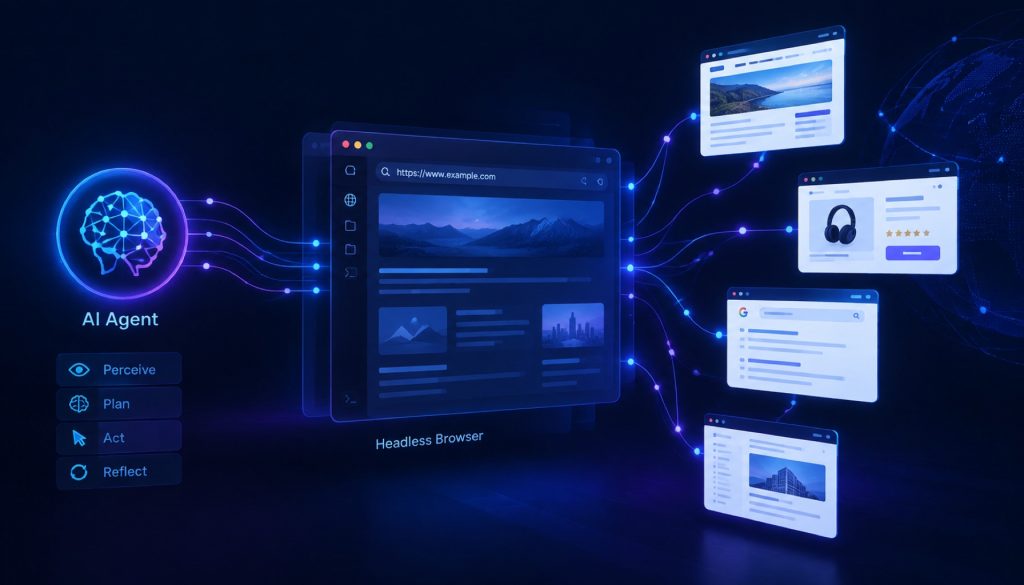
A typical LLM agent running a browser task doesn’t know the full page structure in advance. It receives an instruction, generates an action, executes it, observes what happened, and decides what to do next. That’s a feedback loop, not a script. At each step, the agent needs the browser to answer “what does the page look like right now?” Not just “did this element appear?”
When you use Playwright to give an agent browser access, you have to build that observation layer yourself. Serialize page content into a format the agent can process. Handle the alignment between screenshots and text. Manage session context across steps. Translate between LLM-generated action descriptions and actual DOM operations. None of these tasks is especially hard, but together they add up to a significant amount of glue code, and the specifics vary depending on which agent framework you’re using.
Starting around late 2025, a new category of tools began appearing to address exactly this. Obscura is one of them.
What Obscura Does Differently
Obscura (obscura.sh) starts from a different design premise: build the browser interface for LLM agents from the ground up, rather than adding an agent-friendly layer on top of existing tooling.
A few things stand out from the GitHub documentation and implementation.
The action primitive abstraction sits at a higher level than traditional tools. Instead of click("#submit-btn"), Obscura accepts intent-level descriptions like “click the submit button” and handles the locating and executing internally. The agent doesn’t need to know the selector in advance.
The observation interface is built for LLM consumption. After each action, the browser returns a structured description of the current page state: interactive elements, current URL, main content. The format is optimized for what a language model actually needs. Not raw HTML, and not screenshots, which carry a much higher token cost.
Session management is handled natively. Agent tasks often need to maintain login state across many steps, and Obscura provides built-in support for this without requiring manual cookie serialization at each step.
It’s open source under MIT, self-hostable, and reportedly ships with adapters for LangChain and AutoGen that reduce integration boilerplate. That said, 28,000 GitHub stars doesn’t equal production-ready. It’s a young project, and its community size and stability can’t match Playwright. Adopting it means accepting some early-adopter risk.
The Rest of the Field
To understand where Obscura fits, it helps to look at the full landscape.
Playwright is the most widely used headless browser tool today. Microsoft-backed, cross-engine (Chromium, Firefox, WebKit), with mature APIs and extensive documentation. The limitation is its design assumes deterministic, script-driven operations rather than the observe-act loop that agents need. Using it with agents isn’t impossible, but you’re doing integration work that isn’t core to your product. If your agent’s browser tasks are highly predictable and rarely need dynamic decision-making, Playwright remains a solid choice.
Puppeteer is Google’s Chrome automation library, narrower than Playwright (Chromium only), with a similar API style. Since Playwright came out, Puppeteer’s use cases have largely been absorbed, and new projects rarely reach for it first unless there’s a specific Chrome DevTools Protocol requirement.
Browserbase takes a completely different approach: a cloud-hosted headless browser service designed specifically for AI agent use cases. You don’t manage browser instances, you call the service. It offers session recording, replay, and horizontal scaling, which makes it particularly useful for high-volume agent tasks like bulk data collection or automated testing pipelines. The tradeoffs are cost (it’s a commercial service) and data sovereignty, since your traffic flows through their infrastructure, which may matter depending on your compliance requirements.
Stagehand is an open-source framework from the Browserbase team, built on top of Playwright, exposing a higher-level API with three core methods: act, extract, and observe. Its design goal overlaps with Obscura in that both lower the barrier to connecting LLM agents to browsers, but the implementation approach differs. Stagehand adds an abstraction layer on top of Playwright rather than redesigning from scratch. That means it inherits Playwright’s stability. The tradeoff is that debugging gets harder when something goes wrong at the browser level.
Here’s how the main options compare across a few key dimensions:
| Tool | Design focus | Deployment | License | LLM integration effort |
|---|---|---|---|---|
| Playwright | General automation/testing | Self-hosted | Apache 2.0 | High (build your own layer) |
| Puppeteer | Chrome automation | Self-hosted | MIT | High (same) |
| Browserbase | AI agent native | Cloud-hosted | Commercial | Low (built-in) |
| Stagehand | AI agent framework | Self-hosted/cloud | MIT | Low (included adapters) |
| Obscura | AI agent native | Self-hosted | MIT | Low (native design) |
“LLM integration effort” here is relative, not absolute. You can connect Playwright to LangChain, it just takes more code.
How to Choose
Start by being honest about what your agent actually needs.
If your browser tasks follow a fixed path, where the sequence of operations is known in advance and doesn’t depend on intermediate results, Playwright is the safest choice. Best documentation, largest community, most Stack Overflow coverage. When things break, solutions are findable.
If your agent needs real dynamic decision-making, with unknown page structures, operation paths that depend on what the page shows, and handling unexpected states, then AI-native tooling is worth taking seriously. In that case, Stagehand is probably the lowest-risk starting point. It’s built on Playwright, actively maintained by the Browserbase team, and the learning curve is gentle.
If you need to run agent tasks at scale and don’t want to manage browser infrastructure, Browserbase’s hosted service is worth evaluating. When you factor in operational overhead, a managed service can be more cost-effective than self-hosting at volume.
Obscura fits a more specific profile: self-hosted, MIT-licensed, no commercial dependencies, and you’d rather not write integration glue code. If you’re building an AI agent project from scratch and those constraints fit, Obscura is worth a spike to see whether its API model works for your architecture.
One thing to keep in mind regardless of which tool you choose: target websites keep changing, anti-scraping measures keep evolving, and agent task requirements shift over time. A tool with active maintenance matters more than one with a longer feature list that’s been sitting still for a year.
Related reading
- CloakBrowser vs Playwright Stealth: Picking an Anti-Detect Browser
- Stagehand Alternatives for Browser Automation: A 2026 Production Comparison
- Choosing AI Browser Automation Tools: Browser Use vs Stagehand vs Skyvern vs Playwright in 2026
Stay updated with our latest AI insights