,-
title: “Vercel Alternatives in 2026: Netlify, Cloudflare Pages, Railway, Render, and Fly.io Compared”
slug: “vercel-alternatives-netlify-cloudflare-pages-railway-render-fly-2026-en”
lang: “en”
category: “alternatives-en”
seo_title: “Vercel Alternatives 2026: Netlify, Cloudflare Pages, Railway, Render, Fly.io”
seo_desc: “A candid look at Vercel alternatives in 2026, comparing Netlify, Cloudflare Pages, Railway, Render, and Fly.io on pricing, edge performance, and lock-in risk.”
seo_kw: “vercel alternatives”
,-
Three months ago, a SaaS founder showed me his Vercel bill. Pro plan for three seats, plus bandwidth, Serverless Function execution time, ISR read/writes, image optimization. Seven or eight separate line items, all stacking up to just under $300 a month. His product had 20,000 monthly active users. Five people on the team.
“I can afford it,” he said. “I just can’t figure out what I’m actually paying for.”
This is not an isolated case. Vercel’s pricing model has gotten increasingly granular in 2026. The Pro plan at $20 per seat per month is just the starting gate. Bandwidth overages at $0.15/GB, Edge Requests billed per million, Serverless Functions charged by GB-hour. For projects with volatile traffic, opening the bill at month-end feels like opening a mystery box.
But the deeper anxiety is not about money. The tight coupling between Next.js and Vercel makes some teams feel trapped in a gilded cage. Leaving is expensive. Staying means handing pricing power to the platform.
This article is not here to tell you to leave Vercel. If your project fits, the developer experience really is an industry benchmark. But if you are evaluating alternatives, or if you just want to understand the full landscape of frontend deployment in 2026, these five names are worth your time.
What Vercel gets right, and where the bill comes from
Before looking at alternatives, understand what Vercel actually wins on.
One word: developer experience. Git push triggers automatic deployment, preview URLs appear instantly, Edge Functions work with zero configuration. For Next.js projects, Vercel delivers on the promise of “push code, ship product.” ISR (Incremental Static Regeneration), Server Components, App Router. Vercel is always first and always most complete in supporting Next.js’s newest features.
The problem is that this experience runs on an increasingly complex billing engine.
Pro plan costs $20 per seat per month, which includes $20 of usage credit. Sounds fair. But the credit covers a narrow set of resources. A three-person SaaS team with 250,000 monthly visits and 5 million API requests will end up paying around $300 per month, and that is a conservative estimate. The Enterprise plan starts at roughly $3,500 per month, suitable for large companies with compliance and SLA requirements.
The other hidden cost is lock-in. Vercel has done extensive runtime optimizations for Next.js. Once you use features like Edge Middleware or Image Optimization, migrating to another platform means changing not just your CI/CD config, but your code itself.
So the question becomes: is there a platform that gives you 80% of the experience but with more transparent pricing and looser coupling?
Netlify: the old guard’s persistence
Netlify and Vercel emerged around the same time, both products of the JAMstack movement. But their paths have diverged. Vercel went all-in on Next.js. Netlify chose framework neutrality.
In 2026, that choice turned out to be an advantage. If you use Astro, SvelteKit, Nuxt, Remix, or pure static site generators, Netlify’s support is as deep as Vercel’s support for Next.js. Netlify overhauled its pricing in September 2025, dropping per-seat fees and moving to a credit-based usage model. The free tier remains generous. The Pro plan costs $20 per month with no seat limit, which is friendlier to small teams than Vercel’s per-head pricing.
Netlify’s Edge Functions run on the Deno runtime, with capabilities comparable to Vercel’s Edge Runtime. Built-in features like Forms, Identity, and Split Testing are useful for marketing sites and content sites. On Vercel, you either have nothing or you build it yourself.
The shortcomings are clear. If you rely heavily on the latest Next.js features (Server Actions, Partial Prerendering), Netlify’s support will always lag by a beat or two. Bandwidth overages are $0.55/GB, noticeably higher than Vercel’s $0.15/GB. High-traffic sites need to do the math carefully.
Who is it for? Projects not locked to Next.js, teams with many seats but limited budgets, and projects that need built-in forms, authentication, or A/B testing.
Cloudflare Pages: bandwidth you cannot exhaust, edges you cannot escape
If Netlify is the “old guard all-rounder,” Cloudflare Pages is the one who flipped the table with pricing.
Free plan. Unlimited bandwidth. No per-GB charges, no overage bills. For static sites and JAMstack projects, this is an unbeatable price.
This is not charity. Cloudflare’s business model is built on the entire network ecosystem (DNS, CDN, security, Workers). Pages is the entry point to draw developers into that ecosystem. The bet is that once you use Pages, you will start using Workers, KV, D1, R2, and eventually run your entire stack on Cloudflare.
Performance-wise, Cloudflare has over 300 edge nodes globally, more than any competitor. The TTFB (Time to First Byte) for static assets is nearly the physical lower bound determined by distance. Pages in 2026 fully supports Workers Functions (formerly Pages Functions). You can run server-side logic at the edge. The free plan gives you 100,000 requests per day. The paid version (the $5/month Workers Paid plan) gives you 10 million requests per month.
Where are the limits? 500 builds per month is the hard cap on the free tier. For teams deploying frequently, that is not enough. The runtime is based on V8 isolates, not Node.js. Some libraries that depend on Node APIs will not run. Full-stack framework support is improving (Next.js adapts via @cloudflare/next-on-pages), but the experience is still short of Vercel native.
Another subtle point: Cloudflare Pages DX leans more toward “infrastructure engineer” than “frontend developer.” Wrangler CLI, toml config files, the Service Worker syntax of Workers. For people used to vercel deploy in one line, there is a learning curve.
Who is it for? High-traffic static sites or content sites (blogs, docs, marketing pages), projects sensitive to bandwidth costs, teams already using Cloudflare DNS/CDN, and developers willing to embrace edge-first architecture.
Railway: the secret weapon for full-stack indie developers
Railway does not really feel like a “Vercel alternative.” It answers a different question: “What if I want to deploy frontend, backend, database, and Redis all in one place with one command?”
The $5/month Hobby plan includes $5 in usage credit. The $20/month Pro plan includes $20 in credit. All resources (CPU, memory, bandwidth, storage) are billed by the second. You pay for what you use. No seat fees, no bandwidth tiers, no hidden items. This kind of transparency is rare in this space.
Railway’s core experience: connect your GitHub repo, Railway auto-detects your stack, and everything is online in minutes. Not just the frontend. PostgreSQL, Redis, MongoDB. One click to add them to your project, environment variables injected automatically. For indie developers or early-stage product teams doing side projects, this “full-package” experience saves time that is hard to quantify.
For frontend deployments, Railway supports SSR deployments for Next.js, Vite, Remix, and other mainstream frameworks. But there is a key difference: Railway is container-level deployment, not edge deployment. Your app runs in a specific region (default US West), not distributed globally across edge nodes like Vercel or Cloudflare. If your users are concentrated in one region, this is not a problem. If you need global low latency, you need to consider other solutions or add a CDN layer yourself.
The Hobby plan limits each service to a maximum of 48GB memory and 6 replicas. The Pro plan opens up to 1TB memory and 50 replicas. More than enough for 99% of projects.
Who is it for? Full-stack projects (frontend + API + database deployed together), indie hackers and small startup teams, people who want simple transparent usage-based pricing, and projects that do not need edge deployment. If you care about how databases and Serverless fit together, Railway makes that combination exceptionally simple.
Render: the PaaS with predictable budgets
Render’s product philosophy can be summarized in one sentence: “You pick a plan, I tell you how much it costs, and I will not charge you more.”
This is a sharp contrast to the “usage-based” model of Vercel and Railway. Render’s pricing is plan-based: Web Service from free to $7/month (Starter) and up. You pick the instance specs, pay monthly, and do not worry about surprise charges at the end of the month.
The free tier is also solid. Static sites are permanently free. Web Service has free instances (they hibernate after 15 minutes of inactivity). For personal portfolios and open-source project docs sites that do not need always-on, Render’s free tier is enough. No credit card required, which is rare among PaaS platforms in 2026.
After upgrading to paid tiers, Render’s capability coverage is wide: Web Service, Background Worker, Cron Job, private networking, managed PostgreSQL and Redis, Autoscaling. The goal is not to be “the best frontend deployment platform,” but to be “the easiest-to-understand full-stack cloud platform.”
In frontend scenarios, Render’s biggest shortcoming is the lack of edge capability. Your SSR app runs in Render’s data centers (mainly US and Europe). Static assets are distributed via Cloudflare CDN. For international products, the latency on dynamic requests is not as good as Vercel or Cloudflare Pages.
Build speed is also a common complaint. Render’s free build pipeline is slow. The paid Performance Pipeline costs extra. Compared to Vercel’s “push and preview link appears in 30 seconds,” Render is more like “push the code, make a cup of coffee, then come back and check.”
Who is it for? Budget-sensitive teams that want predictable monthly bills, projects that need unified frontend + backend + database management but do not want to worry about usage, and internal tools or B2B products where deployment speed and edge latency are not critical.
Fly.io: put your app next to your users
Fly.io has a completely different vibe from the other platforms in this article. It is not “replacing Vercel.” It is solving a more fundamental problem: how to make your app physically close to users.
The technical foundation is Firecracker microVMs, running in 35+ regions globally. You give it a Dockerfile, Fly.io packages your app into a lightweight virtual machine and distributes it to the regions you specify. Compared to traditional containers, Firecracker starts in milliseconds, with VM-level isolation but container-level overhead.
Fly.io cut its free tier in 2024. New users now get a 2-hour or 7-day trial (whichever comes first). After that, it is fully usage-based. The smallest shared-cpu-1x/256MB instance costs about $2/month. But in actual use, running a small app (plus Postgres, storage, egress bandwidth) is around $8-25/month, which is higher than the “on-paper price.”
Fly.io’s core value is the simplicity of multi-region deployment. One command (fly scale count 3 ,region nrt,lhr,iad) distributes your app to Tokyo, London, and Washington. For latency-sensitive apps like real-time collaboration tools, global SaaS, and game backends, this capability is hard to get at low cost on other platforms.
But Fly.io has the steepest learning curve of these five platforms. You have to understand concepts like Machines, Volumes, Fly Proxy. You have to write fly.toml config files. You have to handle multi-region database sync. It is more like “infrastructure for developers” than a “deployment platform for frontend.”
Who is it for? Latency-sensitive global products, real-time apps that need multi-region deployment, teams with experience in containers and infrastructure, and technical decision-makers willing to trade more control for lower latency.
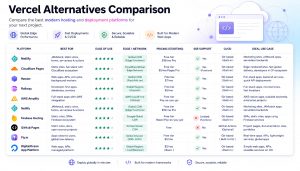
Core feature comparison
| Dimension | Vercel | Netlify | Cloudflare Pages | Railway | Render | Fly.io |
|---|---|---|---|---|---|---|
| ,,,,,- | ,,,, | ,,,,- | ,,,,,,,,, | ,,,,- | ,,,, | ,,,, |
| Free tier | Yes (Hobby) | Yes | Yes (generous) | $5 trial for 30 days | Yes (static sites permanent) | No (trial 2h/7 days) |
| Paid entry price | $20/seat/month | $20/month (no seat limit) | $5/month (Workers Paid) | $5/month | $7/month (Starter) | ~$2/month up |
| Billing model | seat + usage | credit-based | per-request/usage | per-second usage | plan-based (fixed monthly) | per-second usage |
| Edge deployment | ✅ Global | ✅ Edge functions | ✅ 300+ nodes | ❌ Regional | ❌ Regional | ✅ 35+ regions |
| Framework affinity | Next.js first | Framework-neutral | Adapting | Framework-neutral | Framework-neutral | Framework-agnostic |
| Full-stack capability | Medium | Medium | Workers ecosystem | Strong (one-click database) | Strong (full-stack PaaS) | Strong (container-level) |
| DX barrier | Low | Low | Medium | Low | Low | High |
| Bandwidth fees | $0.15/GB overage | $0.55/GB overage | Free (unlimited) | Included in usage | Included in plan | Charged on egress |
How to choose: scenarios decide answers
After reading the analysis above, you probably already have an intuition. Let me make the decision logic clear for a few typical scenarios.
Personal blog or docs site. Cloudflare Pages, no hesitation. Free, unlimited bandwidth, 300+ global nodes, build limits have no impact on low-frequency update sites.
Deep Next.js user, willing to pay for experience. Stay on Vercel. Its support depth for Next.js has no competitor in the short term. The hidden costs of migrating are higher than they look.
Small SaaS or indie hacker full-stack project. Railway. Frontend, API, database, queue all in one place. Usage-based pricing means you pay almost nothing early on, and costs scale predictably as you grow.
Mid-size team, budget priority. Render or Netlify. Render gives you the peace of mind of fixed monthly fees. Netlify gives you the flexibility of no seat limits. Pick based on whether you fear “month-end surprises” or “seat fee stacking.”
Global users, latency-sensitive. Fly.io or Cloudflare Workers (if your logic can run in V8 isolates). Fly.io gives you container-level freedom. Cloudflare gives you a lower entry cost.
Want to escape single-platform lock-in. This is a bigger topic. One clear trend in 2026 is that open-source infrastructure is eating into cloud service profit margins. Building a deployment pipeline with OpenTofu + containers + self-hosted CI/CD that locks into no platform may cost less than you think.
The frontend deployment landscape in 2026
Looking back at this whole battlefield, an interesting divergence is happening. Vercel is increasingly becoming a “framework company” (Next.js is the core asset). Cloudflare is increasingly becoming a “network company” (the edge is the core asset). Railway, Render, and Fly.io have each found their position between “full-stack simplicity” and “distributed control.”
For developers, 2026 is the year with the most choices. No platform can meet all needs, but every need can find a platform that is good enough. Instead of agonizing over “the best,” start by answering a simple question: where are your users, where is your budget, and where is your team’s technical preference?
Once the answer is clear, the platform naturally selects itself.
Stay updated with our latest AI insights