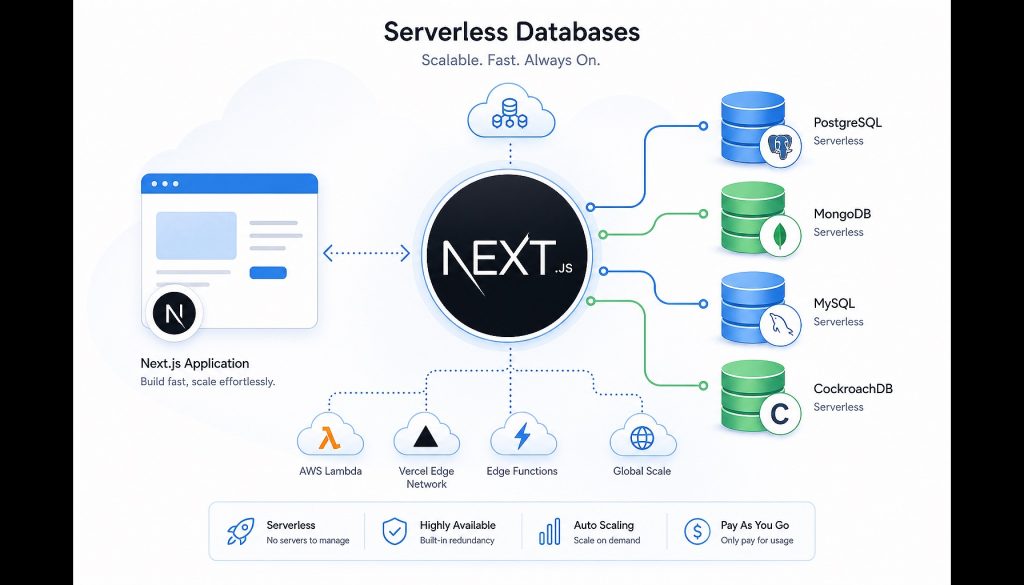
Next.js 14’s App Router pushes server-side rendering to the extreme, but database selection has become the new headache.
Traditional RDS instances have insufficient connection pools, slow cold starts, and wasteful hourly billing. Serverless databases promise pay-as-you-go, infinite scaling, and edge computing optimization, but there are too many products with overlapping features yet distinct characteristics. Supabase calls itself “open-source Firebase,” Neon touts “separated storage and compute,” PlanetScale says “MySQL but no migrations needed,” and Turso claims “SQLite but distributed.”
This article tests 5 mainstream solutions, examining cold start latency, edge deployment compatibility, pricing transparency, and ecosystem maturity to see which best suits Next.js projects.
1. Supabase: Full BaaS Stack, More Than Just a Database
Supabase isn’t purely a database—it’s a complete Backend-as-a-Service. It gives you Postgres + authentication + storage + real-time subscriptions + Edge Functions, solving your Next.js backend needs in one place.
Core Strengths:
- Full-featured Postgres: RLS (Row Level Security), PostGIS (geographic data), full-text search, JSON support—all enterprise features included
- Authentication out-of-the-box: Email, OAuth (Google/GitHub), Magic Link—no need to write login logic yourself
- Real-time subscriptions: Database changes automatically pushed to frontend, perfect for collaboration tools and real-time dashboards
- Edge Functions: Deno runtime, deployed on Cloudflare Workers, cold start < 50ms
Best For: Full-stack Next.js projects, especially those needing real-time features. For example, a team collaboration SaaS where User A’s changes need to sync instantly to User B’s interface—Supabase Realtime solves this directly without rolling your own WebSocket.
Another scenario: indie hacker MVPs. Registration/login + database + file upload—Supabase free tier covers it all. One person can build a complete backend in a week and focus on frontend logic.
Pricing:
- Free: 500MB database + 1GB file storage + 50,000 monthly active users
- Pro: $25/month, 8GB database + 100GB storage
- Team/Enterprise: Custom pricing
Honestly, Supabase’s free tier is the most generous in its category. 50,000 MAU is enough for most side projects for a long time. But once you exceed it, the jump to $25/month is steep for projects that only need a database—because you’re paying for authentication, storage, and Functions infrastructure even if you don’t use them.
Caveats: Supabase’s Postgres instances aren’t “true serverless”—they’re managed instances that sleep on demand. Free tier projects pause after 7 days of inactivity, requiring a wake-up on first access (about 5-10 seconds). Data export is simple (Postgres dump), but migrating authenticated users and stored files requires manual handling.
2. Neon: Serverless Postgres with Separated Architecture
Neon focuses on one thing: making Postgres truly serverless. Its architecture separates storage and compute—data lives in S3, compute layer starts and scales on demand. This brings two core advantages: billing based on actual usage, and extremely fast branch creation (like Git branches).
Core Strengths:
- True serverless architecture: Compute layer auto-sleeps, zero cost at zero activity. Cold start latency about 500ms-1s
- Database branching: Each PR can have its own database branch, isolating preview environments from production data
- No connection pool limits: Traditional Postgres maxes out at a few hundred connections, Neon’s pooling layer handles tens of thousands of concurrent connections
- Time Travel: Free 7-day history retention (30 days paid), can rollback to any past point in time
Best For: Next.js projects running on Vercel, needing separate databases for each preview deployment. Neon’s branching perfectly fits Vercel’s PR preview workflow—each push auto-creates a database branch, auto-deletes on merge, silky smooth developer experience.
Another scenario: projects with fluctuating traffic. Like a news site with 100 QPS normally, suddenly spiking to 10,000 QPS during breaking news. Neon’s compute layer auto-scales up and down, only charging for actual usage.
Pricing:
- Free: 0.5GB storage + 191 compute hours/month (about 6 hours/day)
- Launch: $19/month, 10GB storage + 300 compute hours
- Scale: from $69/month, tiered usage-based pricing
Neon’s billing model is more transparent than Supabase. If your project only has traffic during work hours, sleeping nights and weekends, monthly costs stay very low. But for 24/7 high-traffic projects, compute hours add up fast.
Caveats: Cold start latency (500ms-1s) is slower than Supabase, not suitable for scenarios requiring ultra-fast first response. Postgres only—no authentication, storage, or other extras. You’ll need to integrate those separately if needed.
3. PlanetScale: MySQL Without Migrations
PlanetScale is based on Vitess (the MySQL sharding solution YouTube uses to handle 1 billion users), offering “zero-downtime schema changes” and “branch development.” Its philosophy: database schema changes should be as safe and predictable as code deployments.
Core Strengths:
- Non-blocking schema changes: Alter table structure without locking tables, zero production downtime
- Branches and Deploy Requests: Change schema in branches, test, then merge to main—like a Git workflow
- Auto-sharding: When data outgrows single-machine capacity, PlanetScale auto-shards horizontally, transparent to application layer
- Built-in connection pooling: No need to set up PgBouncer or manage connection pools yourself
Best For: Collaborative medium-to-large Next.js projects with frequent schema changes. Traditional MySQL migrations require downtime and high rollback risk—PlanetScale’s Deploy Requests turn schema changes into reviewable, rollback-capable processes.
Another scenario: projects growing from small to large. Start with a single table of tens of thousands of rows, later scale to millions of users—PlanetScale auto-shards without code rewrites.
Pricing:
- Hobby: 5GB storage + 10 billion row reads/month + 10 million row writes/month, free (free tier restored in 2024)
- Scaler: from $39/month, charged per read/write rows
- Enterprise: Custom contracts
PlanetScale was heavily criticized after eliminating its free tier in 2023, then restored it in 2024. But the free tier is more restrictive than Neon and Supabase (only 1 production branch, no Deploy Requests). Teams needing branching features require at least the Scaler plan.
Caveats: MySQL isn’t Postgres. No advanced JSON field queries, no RLS, no PostGIS. If your project depends on Postgres features, PlanetScale isn’t suitable. April 2026 announcement dropping foreign key support sparked community controversy. Their reasoning: foreign keys are hard to maintain in sharded architecture, but this is a problem for projects relying on referential integrity.
4. Turso: SQLite at the Edge
Turso is the most unconventional choice—it’s neither Postgres nor MySQL, but libSQL (a fork of SQLite). Core selling point: “SQLite but distributed,” with database instances deployed on global edge nodes for query latency < 10ms.
Core Strengths:
- Extremely low latency: Database replicas deployed on edge nodes closest to users, queries don’t cross continents
- Embedded compatibility: Use SQLite files directly in local development, data auto-syncs when deploying to Turso
- Charged per database instance count: Not by storage or traffic, but by how many databases you create
- Multi-tenant friendly: Each tenant gets a separate database instance, natural isolation
Best For: Global Next.js SaaS with users across continents. For example, a collaboration tool where US users hit US node database replicas, EU users hit EU nodes—query latency drops from 200ms to 5ms, transformative user experience.
Another scenario: multi-tenant B2B SaaS. Each enterprise customer gets a separate database instance (database-per-tenant architecture), complete data isolation, lower compliance risk.
Pricing:
- Starter: 8GB storage + 1 location + 500 databases, free
- Scaler: $29/month, additional locations $10 each/month
- Enterprise: Custom
Turso’s pricing model suits multi-tenant scenarios. If your SaaS has 500 enterprise customers, one database each, Turso’s free tier covers it. Same scenario on Supabase or Neon would charge per-tenant data volume.
Caveats: SQLite ecosystem is smaller than Postgres/MySQL. No PostGIS, no full-text search (requires separate integration), limited ORM support. Writes replicate to all edge nodes, cross-region write latency higher than single-region. Best for read-heavy scenarios.
5. Firebase (Firestore): NoSQL with Mature Ecosystem
Firebase is Google’s BaaS platform, Firestore its NoSQL database. Though not a SQL database, it’s worth considering due to mature Next.js integration and rich ecosystem.
Core Strengths:
- Real-time sync: Data changes auto-push to all clients, perfect for chat and collaboration tools
- Offline support: Local cache + auto-sync, great experience in poor network conditions
- All-in-one: Authentication + database + storage + Analytics—even more comprehensive than Supabase
- Generous free tier: 1GB storage + 50K reads/day + 20K writes/day
Best For: Mobile-first projects needing offline support. Like a Next.js + React Native cross-platform app where users operate in subway, auto-syncing when they emerge—Firestore’s offline mode handles this natively.
Another scenario: MVP prototyping. Firestore’s flexible schema lets you rapidly iterate data structures without writing migrations. Once product is validated and data model stabilizes, consider migrating to SQL.
Pricing:
- Spark (free): 1GB storage + 50K reads/day + 20K writes/day
- Blaze (pay-as-you-go): $0.18/GB storage/month + $0.06/100K reads + $0.18/100K writes
Be careful with Firestore read/write billing. Poorly optimized queries scanning many documents will spike costs. Enable budget alerts.
Caveats: NoSQL means no JOINs, no transactions (across documents), no complex queries. If business logic depends on relational data, Firestore is painful. Heavy vendor lock-in. Firestore’s data format and query API are Google-proprietary—migrating to other databases requires massive code rewrites.
Comparison Table
| Database | Type | Cold Start | Edge Deploy | Free Tier | Best For |
|---|---|---|---|---|---|
| Supabase | Postgres (BaaS) | 5-10s (wake) | ❌ | 500MB + 50K MAU | Full-stack Next.js, needs auth + realtime |
| Neon | Postgres (Serverless) | 500ms-1s | ✅ (read replicas) | 0.5GB + 191h/month | Vercel deploys, fluctuating traffic |
| PlanetScale | MySQL (Serverless) | < 1s | ❌ | 5GB + limited branches | Frequent schema changes, team collaboration |
| Turso | SQLite (Edge) | < 100ms | ✅ (global) | 8GB + 500 databases | Global users, multi-tenant isolation |
| Firestore | NoSQL (BaaS) | < 100ms | ✅ | 1GB + 50K reads/day | Mobile + offline support |
Selection Guide
Full-stack Next.js, solo developer: Supabase. Authentication, database, storage all included—no need to integrate multiple services. Free tier lasts long.
Deploying on Vercel, need preview environments: Neon. Database branching perfectly matches Vercel’s PR preview workflow, best developer experience.
Team collaboration, frequent schema changes: PlanetScale. Deploy Requests turn database changes into reviewable processes, avoiding production incidents.
Global product, users across continents: Turso. Edge node deployment drops query latency to under 10ms, noticeable experience improvement.
MVP rapid validation, data structure still uncertain: Firestore. NoSQL flexibility enables fast iteration, consider migrating once model stabilizes.
Existing Postgres skills, don’t want to learn new things: Neon or Supabase. Both are standard Postgres, existing knowledge directly applies.
Common Misconceptions
Misconception 1: “Serverless databases are always cheaper than traditional RDS”
Not necessarily. For 24/7 high-traffic projects, Neon’s compute hours might exceed RDS instance costs. Serverless advantages shine in fluctuating traffic or low-traffic scenarios.
Misconception 2: “Edge databases always have low latency”
Only true for reads. Writes need cross-region replication, potentially higher latency. Turso suits read-heavy workloads, not high-frequency writes.
Misconception 3: “Free tier = always free”
Free tiers usually have hidden limits: Supabase pauses after 7 days inactivity, PlanetScale free tier can’t use branches, Neon only has 191 compute hours/month. Calculate actual costs carefully.
Conclusion
There’s no silver bullet for Next.js database selection. Supabase suits full-stack rapid development, Neon fits Vercel ecosystem, PlanetScale for team collaboration, Turso for globalization, Firestore for prototyping.
The core of choosing: what stage is your project? Solo MVP, 5-person team, or 50-person company? Where are users? What’s the traffic pattern? Answer these, and the choice becomes obvious.
Final advice: don’t over-optimize. For early projects, choose Supabase or Neon, optimize when you hit bottlenecks. Database migration costs aren’t as high as you think, but time wasted on premature optimization is real.
Related Reading
- Choosing a Database for Your Next.js Project: Supabase vs Neon vs PlanetScale vs Turso (2026)
- Serverless Databases for Next.js 14: Supabase vs Neon vs PlanetScale vs Turso vs Firestore
Stay updated with our latest AI insights